12-Amethyst
April 1, 2025
Solved

Fetch BOM data with REST API

  • April 1, 2025
  • 4 replies
  • 757 views

Version: Windchill 12.1


Use Case: How to use the PTC.ProdMgmt.GetBOM with the POSTMAN App?


Description:

Hello community, In my case i want to fetch some data from my BOM (in the picture) 
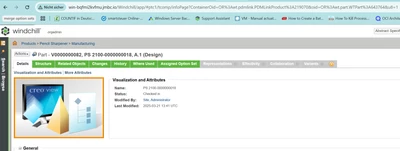
EC_10581209_0-1743496179447.png

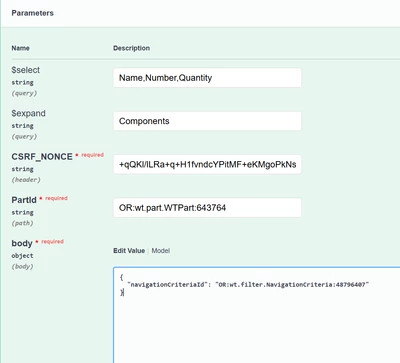
so i need to fill the parameters

EC_10581209_1-1743497501105.png

I've used the PartID from the first picture in the URL, the CSRF NONCE i got from this Link http://<Windchill HOME>/Windchill/servlet/odata/PTC/GetCSRFToken() 

and copied the code  in the CSRF_NONCE Field

i am not sure what to type in the body can I let it emty?

when I click Execute i get the Link with error code 400
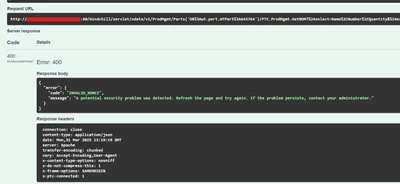
EC_10581209_2-1743498056669.png


Thanks in advance


Best answer by aman.somgade

Please refer to https://community.ptc.com/t5/Windchill-Customization/Fetch-BOM-Data-from-WRS/m-p/1008616#M9744

If you have still have specific doubts, let me know.

4 replies

16-Pearl
April 2, 2025

Are you sure the part you queried has a BoM, I noticed the version is A.1

Fadel
23-Emerald I
April 2, 2025
Catalina
Community Moderator
April 8, 2025

Hi @EC_10581209 


I wanted to see if you got the help you needed.


If so, please mark the appropriate reply as the Accepted Solution or please feel free to detail in a reply what has helped you and mark it as the Accepted Solution. It will help other members who may have the same question.


Of course, if you have more to share on your issue, please pursue the conversation.


Thanks,

Catalina | PTC Community Moderator
12-Amethyst
April 8, 2025

Please refer to https://community.ptc.com/t5/Windchill-Customization/Fetch-BOM-Data-from-WRS/m-p/1008616#M9744

If you have still have specific doubts, let me know.