18-Opal
December 6, 2017
Solved

How to check the type of WTObject and run an expression

  • December 6, 2017
  • 1 reply
  • 5958 views

I wrote the following code in the expression but it does not run

wt.fc.QueryResult qr= wt.maturity.MaturityHelper.service.getPromotionTargets(pn);

while (qr.hasMoreElements()) 
{
 if(qr.type.equals("EPMDocument")
 {
 wt.lifecycle.LifeCycleManaged lifeCycleManaged = (wt.lifecycle.LifeCycleManaged) qr.nextElement();
 wt.lifecycle.LifeCycleServerHelper.service.setState(lifeCycleManaged, wt.lifecycle.State.toState("DESIGNCHANGE"));
 }
}


I want to check the type of the object and change the lifecycle state only if it is an EPMDocument
Can you help me please?

Best answer by ShirishMorkhade_238755

Hello,


Here is a precise code (highlighted in red) for your reference. Thought I have demonstrated it for wt.part.WTPart type, you can use wt.epm.EPMDocument for EPMDocument type.


wt.fc.QueryResult qr= wt.maturity.MaturityHelper.service.getPromotionTargets(pn);
while (qr.hasMoreElements()) 
{
	wt.fc.WTObject obj =(wt.fc.WTObject) qr.nextElement();
	if(obj instanceof wt.part.WTPart){
		wt.part.WTPart prt = (wt.part.WTPart) obj;
		System.out.println("****** " + prt.getNumber());
// Add you logic here } }


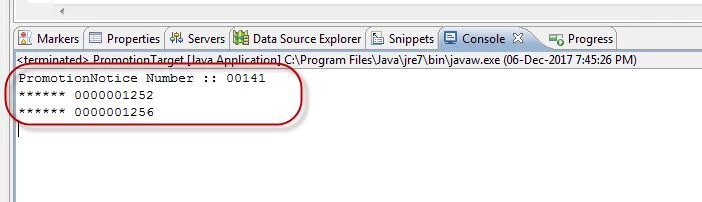
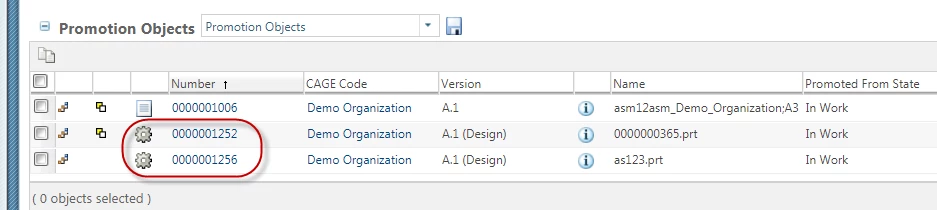
Output:

PN Output.png


PN Output1.png


I hope it helps you.


Regards,

Shirish


1 reply

16-Pearl
December 6, 2017

Hello,


Here is a precise code (highlighted in red) for your reference. Thought I have demonstrated it for wt.part.WTPart type, you can use wt.epm.EPMDocument for EPMDocument type.


wt.fc.QueryResult qr= wt.maturity.MaturityHelper.service.getPromotionTargets(pn);
while (qr.hasMoreElements()) 
{
	wt.fc.WTObject obj =(wt.fc.WTObject) qr.nextElement();
	if(obj instanceof wt.part.WTPart){
		wt.part.WTPart prt = (wt.part.WTPart) obj;
		System.out.println("****** " + prt.getNumber());
// Add you logic here } }


Output:

PN Output.png


PN Output1.png


I hope it helps you.


Regards,

Shirish


CHASEONHO18-OpalAuthor
18-Opal
December 7, 2017

thank you!
Did you link Eclipse with PDMLink?
Can you tell me how?
It's okay to give me a link
Please.

16-Pearl
December 7, 2017

Sure. here is the comamnd which guide you throught the step by step instructions to do this:


ant -f bin\tools.xml eclipse_project.help


Copying below are the exact steps:


 [echo] 0) Install FileSync
     [echo]    a) Start Eclipse
     [echo]    b) Accept the default workspace (we'll, later, assign a different one)
     [echo]    c) Select Help -> Install new software...
     [echo]    d) Click Add... (next to "Work with:")
     [echo]    e) Set Name to FileSync and Location to http://andrei.gmxhome.de/eclipse/
     [echo]    f) Click OK, then wait until the "Pending..." text disappears
     [echo]    g) Type FileSync in the text are with the grayed-out text reading "type filter text"
     [echo]    h) Select the FileSync for Eclipse 3.6 (currently under Eclipse 3.5 - 3.7 plugins)
     [echo]    i) Click Next >, wait, then click Next > again
     [echo]    j) Select the "I accept the terms of the license agreement" radio button
     [echo]    k) Click Finish
     [echo]    l) OK the Security Warning
     [echo]    m) Click Not Now, then exit Eclipse.
     [echo] 1) Run the eclipse_project task 
     [echo] 2) Launch Eclipse, specifying D:\ptc\Windchill_10.1\Windchill/../eclipse as the workspace
     [echo] 3) Import the cust_Windchill_src project
     [echo]    a) File -> Import... -> General -> Existing Projects into Workspace
     [echo]    b) Select Browse (next to "Select root directory") and click OK
     [echo]    c) Your project will be listed and checked; click Finish.


I hope it helps you.


Regards,

Shirish