
17-Peridot
November 1, 2017
Solved

How to Display Integer Attribute Values without a Comma?

  • November 1, 2017
  • 1 reply
  • 4799 views

Hi, could someone confirm the inability to display an integer attribute value without a comma? I never expected this to be a limitation, but found the following ideas to support it.


Integer Attribute DisplayInteger Attribute Display

If there is no way to remove the commas, does anyone have a good way to validate a string attribute to ensure it only contains integers? I'm guessing a Regular Expression constraint on the attribute?


Would be nice to use the Integer attrbute, so please vote up the ideas if you agree.


Best answer by ShirishMorkhade_238755

Yes, you are absoulutely right. 

but to make it work for folder page, its not a big deal. Simply add below extry to site.xconf for the IBA internal name and propagate the changes and restart MS and you're all set.


<!-- Thie entry is added to display Interger Number without command on Folder page -->
 <Property name="wt.services/svc/default/com.ptc.core.components.descriptor.DataUtility/IBA|com.ptc.ptcnet.SalesOrderNumber/java.lang.Object/0"
 overridable="true"
 targetFile="codebase/service.properties"
 value="ext.DataUtilities.CustomNumberFormatDataUtility/singleton"/>
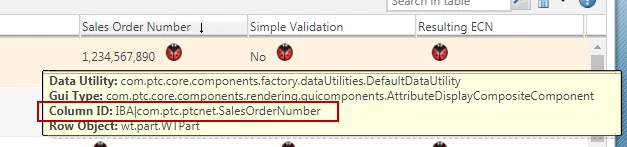
 

 jcaDebug.png


Where,

IBA|com.ptc.ptcnet.SalesOrderNumber is a IBA internal display as displayed when you apply &jcaDebug=1 to folder page. And,

ext.DataUtilities.CustomNumberFormatDataUtility is a fully qualified classname for data utility.


Results will be like this:

folderpage.png


I hope this helps you.


Regards,

Shirish 


1 reply

16-Pearl
November 1, 2017

Hi Scott,


you can do so by writing custom data utility and registering it against the attribute. I am able to display integer value without comma using below code snippet:


public class CustomNumberFormatDataUtility extends DefaultDataUtility {

	@Override
	public Object getDataValue(String arg0, Object arg1, ModelContext arg2) throws WTException {
		System.out.println(" *** Inside CustomNumberFormatDataUtility");
		
		Object superval = super.getDataValue(arg0, arg1, arg2);
		
		ComponentMode mode = arg2.getDescriptorMode();
		if (!(ComponentMode.CREATE.equals(mode) || ComponentMode.EDIT.equals(mode)))
		{
			System.out.println("*** Not a Create/Edit View");
			if(superval.getClass().equals(AttributeDisplayCompositeComponent.class)){
				AttributeDisplayCompositeComponent oldgui=(AttributeDisplayCompositeComponent)superval;
				if (oldgui.getValueDisplayComponent().getClass().equals(NumericDisplayComponent.class)){
					AttributeDisplayCompositeComponent gui=new AttributeDisplayCompositeComponent("composite");
					TextDisplayComponent textGUI= new TextDisplayComponent("text");
					textGUI.setValue(oldgui.getPrintableValue().replaceAll(",", ""));
					gui.setValueDisplayComponent(textGUI);
					return gui;
				}
			}
			return superval;
		}else{
			return superval;
		}
	}
}

Here is the output:

IBADisplay.png


17-Peridot
November 5, 2017

But this data utility works only for Info-Page, Edit, Create etc. pages, but not for folder or table columns.

16-Pearl
November 6, 2017

Yes, you are absoulutely right. 

but to make it work for folder page, its not a big deal. Simply add below extry to site.xconf for the IBA internal name and propagate the changes and restart MS and you're all set.


<!-- Thie entry is added to display Interger Number without command on Folder page -->
 <Property name="wt.services/svc/default/com.ptc.core.components.descriptor.DataUtility/IBA|com.ptc.ptcnet.SalesOrderNumber/java.lang.Object/0"
 overridable="true"
 targetFile="codebase/service.properties"
 value="ext.DataUtilities.CustomNumberFormatDataUtility/singleton"/>


 jcaDebug.png


Where,

IBA|com.ptc.ptcnet.SalesOrderNumber is a IBA internal display as displayed when you apply &jcaDebug=1 to folder page. And,

ext.DataUtilities.CustomNumberFormatDataUtility is a fully qualified classname for data utility.


Results will be like this:

folderpage.png


I hope this helps you.


Regards,

Shirish