17-Peridot
October 1, 2019
Solved

How to edit Task and Promotion Request pages using Templates?

  • October 1, 2019
  • 1 reply
  • 2141 views

Good afternoon, what Templates can be used to edit the task and Promotion Request pages in Windchill.
And how to see the result and appearance after editing?

Best answer by VladiSlav

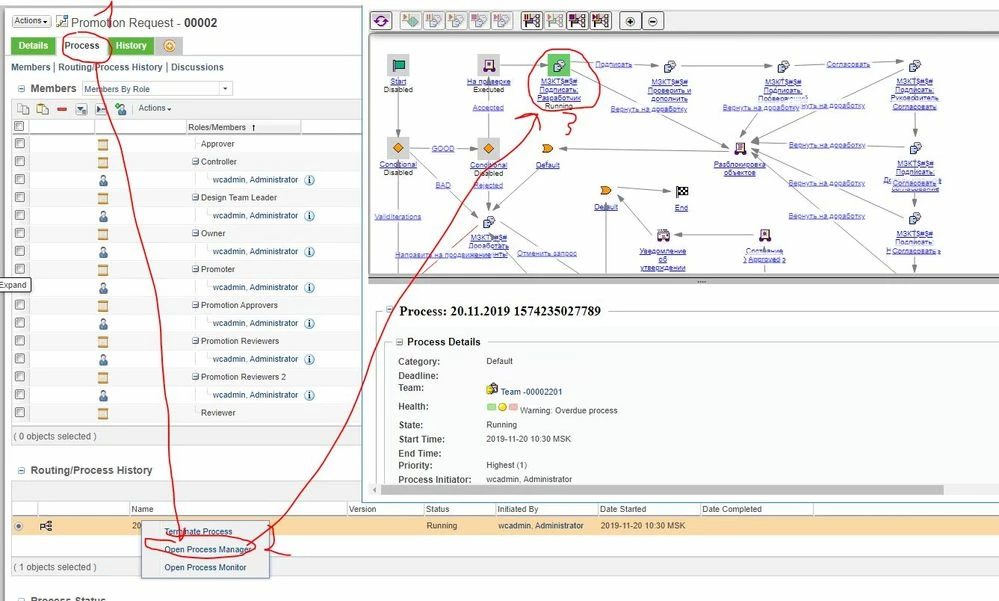
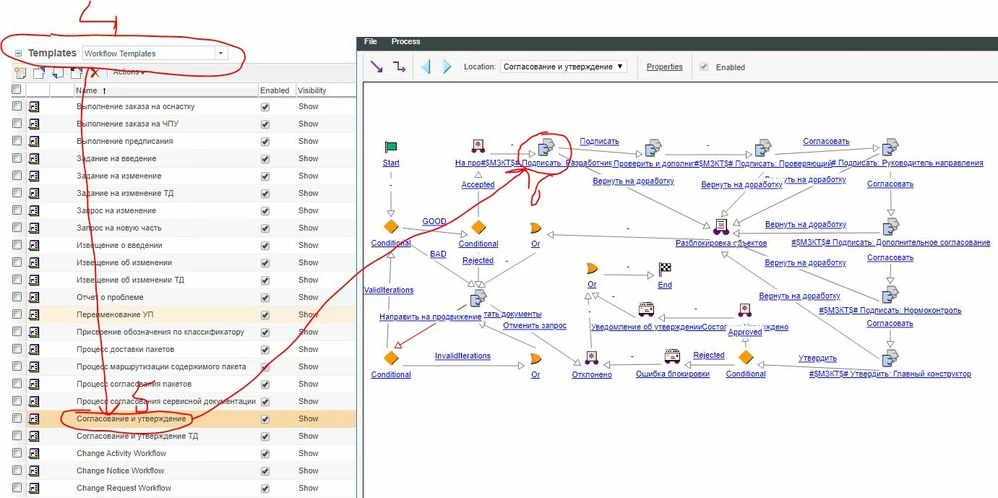
Hello everyone, after a long time I was prompted the solution. I will share with you. All steps are drawn in the screenshots:
a) First, open the processes, remember what is highlighted in green - it will be the right place for us ;
b) look for a similar process in the list of templates.;
c) edit the place that was which was highlighted in paragraph number 1;
d) to see the result, you need to create a new Promotion Request
e) you can do the same with other templates

I already asked a question in which @yadavankur made clear screenshots of how I edited the process, I did not get the desired result, but it shows the work with templates:

https://community.ptc.com/t5/Windchill/Where-to-write-the-code/td-p/630464
 

1.JPG


2.JPG


1 reply

VladiSlav17-PeridotAuthorAnswer
17-Peridot
November 26, 2019

Hello everyone, after a long time I was prompted the solution. I will share with you. All steps are drawn in the screenshots:
a) First, open the processes, remember what is highlighted in green - it will be the right place for us ;
b) look for a similar process in the list of templates.;
c) edit the place that was which was highlighted in paragraph number 1;
d) to see the result, you need to create a new Promotion Request
e) you can do the same with other templates

I already asked a question in which @yadavankur made clear screenshots of how I edited the process, I did not get the desired result, but it shows the work with templates:

https://community.ptc.com/t5/Windchill/Where-to-write-the-code/td-p/630464
 

1.JPG


2.JPG
