
5-Regular Member
June 15, 2015

Flexibility in Workgroup Manager Compatibility with Windchill.

  • June 15, 2015
  • 26 replies
  • 17849 views

Prior to Windchill 11.0: Required using the same Windchill Workgroup Manager CPS on both the server and client machines.


Windchill 11.0 M010 Onwards:

You can use different CPS levels on the Windchill server and client machines within the same maintenance release.

Workgroup Manager will now check version compatibility at the Windchill maintenance version level; not at the CPS level.

Windchill Workgroup Manager is no longer installed from the Windchill server.

A company now has the flexibility to have their end users at desired CPS levels and still connect to a single Windchill server.


For example, the following scenario is supported.

A company has Windchill 11.0 M010 CPS05 server and user ‘A’ can connect to the Windchill server with Windchill Workgroup Manager 11.0 M010 CPS03 and user ‘B’ can connect to the same server with Windchill Workgroup Manager 11.0 M010 CPS07.


Illustrated below is the supported configuration.
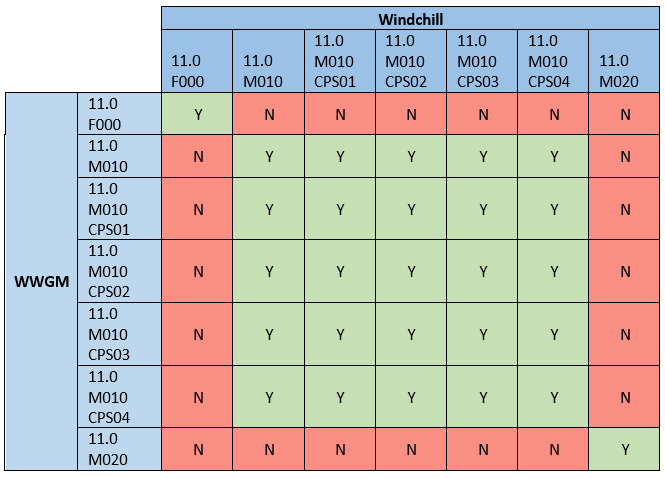


26 replies

23-Emerald IV
June 24, 2015

Gary, just saw CS211115 come out today.  Is this by chance your doing related to this topic?

5-Regular Member
June 26, 2015

Hi Tom,

Not entirely, this has been posted by a colleague and knowledge domain expert in China and appears to be based on PTC Services customization.

One thing I would say about this article and sample code available through it, is that the code is provided 'as-is' and is not supported by PTC.  So if you plan to utilize this, make sure you test fully before deploying in production (and I'll be adding a note to this effect).

I hope this goes some way to addressing your problems but please do provide feed back via the widget on the article, if there are any problems.

Regards,

Gary

5-Regular Member
June 29, 2015

Tom, just so you are aware, article CS211115 has been unpublished temporarily whilst it receives an internal face-lift to improve the wording and remove errors in the procedure.  The customization code is mature and if you've managed to implement this using the initial instructions, you're all good but if you struggled, wait until it's re-posted in the next day or so.

All feedback regarding the unsupported custom Scheduler Method and/or command-line utility version of the same are welcome and I hope it does go some way towards addressing some of the problems you are experiencing in this area.

23-Emerald IV
June 29, 2015

Gary, thanks for the update.  I haven't had a chance to implement yet.  The one thing I was concerned about was how it would impact our already existing publish helper.  Not sure if I have to combine them or if they can co-exist separately...

5-Regular Member
July 24, 2015

Tom UminnBill Ryan‌ et al,

So, in response to your comments, I am planning a Blog post around Publishing / Republishing Based on custom criteria, e.g. from a CSV or using filters like in the recent article CS211115.

Let me know if there are any specific points you would like me to approach but bear in mind I am no customization engineer.

16-Pearl
July 27, 2015

That's a loaded question Gary!  From my perspective, you will have 99% of it covered if the Blog covers publishing and republishing from a CSV file created from a search query or a custom report.  Here are a couple search/report criteria as examples:

1) All Assemblies or Parts residing in large assembly structure without a representation

2) All Assemblies published using Object Adapter XXX between the Dates of aa/yy/zz and xx/yy/zz  (this might be a republish list)

3) All Assemblies with extended positioning assembly parameter where lower level component has been iterated. (republish)  (This may not be a report...I believe you put a flag in place for this action)

4) All Released cad objects with part number format "xyz"

5) All Assemblies or Parts without a representation and modified between the dates of aa/yy/zz and xx/yy/zz.  (I can run a monthly report and find out which objects failed in the publisher...my current process is to look at the WVS job monitor to filter on the failed items....problem with this process is that we purge failed items every Saturday night)  

As you can see, I have plenty of use cases!

23-Emerald IV
September 14, 2015

Gary Jackson‌,

Any news on your next blog post?  I've managed to build a pretty crazy SQL statement to locate all Windchill objects that are released but don't have the proper additional files.  Now I just need a way to republish these guys.  CS211115 doesn't seem to allow CSV type input.  Anxiously awaiting a solution...

23-Emerald IV
September 15, 2015

Gary Jackson‌,

Is it possible to configure the queues to only allow publishing at certain times of the day, and then outside of those times keep any remaining or newly submitted jobs at "ready" until the next publish window opens up?  I don't want jobs to fail just because a CAD worker isn't available.  They should simply wait until one does become available again, regardless of how long that is.  Is this possible?  Thanks.

5-Regular Member
September 15, 2015

Careful use of dedicated Pubilsher Queue Sets and the publish.publishqueue.availabletimes.<queuename> properties should help with this.  It was not specifically designed for disabling all publishing and there may be some issues because of this but it's worth a try.  Take a look at the articles in the knowledge base and the WVS Guide for more information.

5-Regular Member
September 15, 2015

I'm starting work on this now.  I am no programmer, so this will be more conceptual than sample code to resolve the input file / CSV list use case specifically but I'll see what I can find across PTC for this.