

1-Visitor
May 7, 2019
Solved

2D drawing template in sheets of the same drawing

  • May 7, 2019
  • 1 reply
  • 1591 views

Hi!! Im using creo 3.0 and I have created 4 drawing templates each of one sheet. I need to use 2 templates that I created in one drawing. I dont understand how to add the template in sheets other than the 1st sheet. I get the needed template in the 1st sheet by just selecting new- drawing-choosing the part- choosing the template and then selecting ok. 

How to do this for 2nd, 3rd and other sheets?
Best answer by lhoogeveen

I don't think this is out of the box functionality (might be a good opportunity to create a Product Idea for people to vote on). I can think of two options:

  • Create more templates with the desired combinations. This can quickly multiply to a lot of templates.
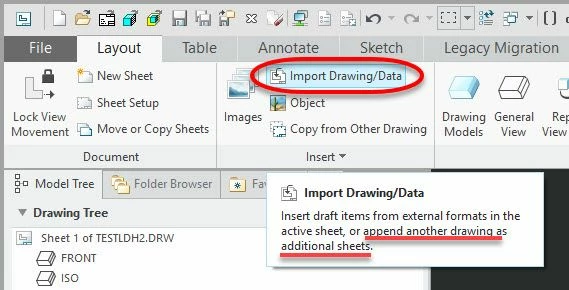
  • Create two separate drawings and combine them using the Import Drawing/Data command. Save 1st drawing created from template that has the desired file name, create 2nd drawing from another template 'in session' without saving, and with 1st drawing open, 'Import Drawing/Data' from 'in session' to add the 2nd drawing to the first drawing. The 'in session' portion is optional but allows the temporary 2nd drawing to be removed without having to save or delete files later. If you do this enough, you could create a Mapkey to speed things up.

Creo Imprt Drawing.jpg

1 reply

17-Peridot
May 7, 2019

I don't think this is out of the box functionality (might be a good opportunity to create a Product Idea for people to vote on). I can think of two options:

  • Create more templates with the desired combinations. This can quickly multiply to a lot of templates.
  • Create two separate drawings and combine them using the Import Drawing/Data command. Save 1st drawing created from template that has the desired file name, create 2nd drawing from another template 'in session' without saving, and with 1st drawing open, 'Import Drawing/Data' from 'in session' to add the 2nd drawing to the first drawing. The 'in session' portion is optional but allows the temporary 2nd drawing to be removed without having to save or delete files later. If you do this enough, you could create a Mapkey to speed things up.

Creo Imprt Drawing.jpg