1-Visitor
May 8, 2022
Solved

A function as basic as breathing in the real world: Auto-horizon-locking (when rotating the view)

  • May 8, 2022
  • 4 replies
  • 4952 views

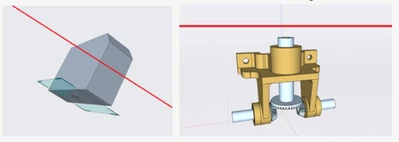
Auto horizon locking: Keeping the horizon always horizontal when rotating the view, which is equivalent to keeping the direction of gravity always vertical


Imagine you're making a model in the real world, you want to walk around your model to check its form or structure from different angles. But just as you start walking around the model, something magic happened, the horizon of the whole world began to tilt randomly. You have to struggle to keep your balance while continuing to think and create your model.-----This is exactly what happens when there is no "Auto-horizon-locking" feature.


This should be a function as basic as breathing in the real world, arguably more basic than anything else.


All existing relevant functions (orient mode ) are far from  "Auto-horizon-locking".They all require extra tedious and unintuitive steps.


PTC has created an excellent product. But we hope PTC will pay attention to this missing basic feature that can seriously impact the user experience, perhaps especially for expanding the market, as many of the existing users may be used to suffering from balancing.


We're not dreaming of magical features, we just want to create models without the extra distraction of worrying about our breathing all the time. Thanks.

 

HH_10302972_0-1652005764840.png


Best answer by StephenW

Creo Parametric does not have a horizon lock. You can submit a product "idea" here https://community.ptc.com/t5/Creo-Parametric-Ideas/idb-p/creoparametric


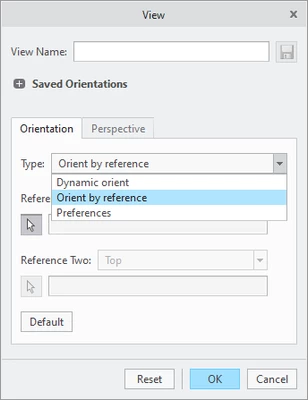
The only option that I have seen could be the re-orient window, where you can rotate based on horizontal/vertical/normal or any selected entity.

Go to the view tab, select the drop down arrow next to saved orientations, then select Reorient.

You can orient by reference (which is a select entity) or dynamic (which is horizontal, vertical, or normal to the screen)


StephenWilliams_0-1652120906087.png


I personally wouldn't care for a horizon lock. My parts are used in a 3-dimensional world and I need to see if there is a problem from any angle, but that is my opinion only. It is often some parts are used in multiple orientations within my assemblies and its not unusual or my assemblies to have a motion that carries them out of a horizon type context...but this is my experience. I have learned over the years on the community that there are a million users and a million different applications of the software.


4 replies

23-Emerald III
May 9, 2022

@Walker  Which software are you using?

Walker1-VisitorAuthor
1-Visitor
May 9, 2022

PTC parametric 7.0

14-Alexandrite
May 9, 2022

Use Shift + (Alt) + Arrow keys - available in Creo 9.0.

Walker1-VisitorAuthor
1-Visitor
May 9, 2022

Thank you for your reply. But I don't get the relevance of this to the problem i described.

Patriot_1776
22-Sapphire II
May 9, 2022

Well, never having used this "Auto-Locking" of which you speak, I can't say as if I'd find it better.  I'm so used to what's current (Creo 4 - yup, we're way behind) after using Pro/E for 25+ years, it's just second nature.  I DID prefer the older way of moving/spinning/scaling the viewpoint though.  I DO have the config.pro setting that eliminates the "Spin Center" and thus the view spins about my picked point instead, and I much prefer that.  Can't remember exactly what that setting was though, it might benefit you in addition to the "alt" method also listed for Creo 9.


Me, I'm waiting to see what fancy new name they pick for Creo next...

kdirth
21-Topaz I
21-Topaz I
May 9, 2022

Config to turn of spin center:

spin_center_display no

There is always more to learn.
Patriot_1776
22-Sapphire II
May 9, 2022

Yeah, that sounds right, just didn't have the time to look it up.  Thx!

5-Regular Member
May 2, 2025

I would also reeaalllly appreciate this "horizon locking" or "keep vertical up" behavior/setting.
Every other modeling program has this:

>  Solidworks "Rotate about scene floor"
>  Inventor "Constrained Orbit"
>  OnShape "Set default rotation behavior to constrained rotate" (or hold Alt while rotating)
>  Sketchup, Revit, and Maya have this behavior as default (afaik)


I've been searching once a week in case there's an update, or someone figures something out.

5-Regular Member
May 5, 2025

For those of you still looking/waiting for "horizon lock," I found something that could be helpful.  Most useful if you're going to spend some time inspecting/familiarizing with/presenting a model.  It's not really worth it for small/short model manipulations.


I created a mapkey to enter Orient Mode in the Anchored setting (set to "AA").  This at least seems to give different manipulation control, and a reference (the anchored triangle), to model manipulation.  Anchored mode does a little stutter every 90deg of rotation, which could be a little distracting but it's subtle enough. 


I also set a keyboard shortcut to Orient Mode (Shift + A), which can be used to disable (or enable) Orient Mode. (So, the workflow is "AA", rotate model for a while, "Shift + A".)


You can't select any model geometry in Orient Mode.  Not a solution, but potentially preferrable on ocassion.  Give it a shot.