

1-Visitor
March 22, 2017
Solved

Add a dimension to a table

  • March 22, 2017
  • 2 replies
  • 4996 views

Hello,


  I have several start parts that I use to design fixtures.  One is a simple dowel pin 6.35 mm dia.

I want to create a parameter that would display in a table the diameter which will always be 6.35 mm and the length which would vary.

The capture below is what I tried but it displays in my table just as typed and does not display the d1 dimension which is my length.

Anyone have any advice on the proper syntax to use?

I am using Creo 4.0
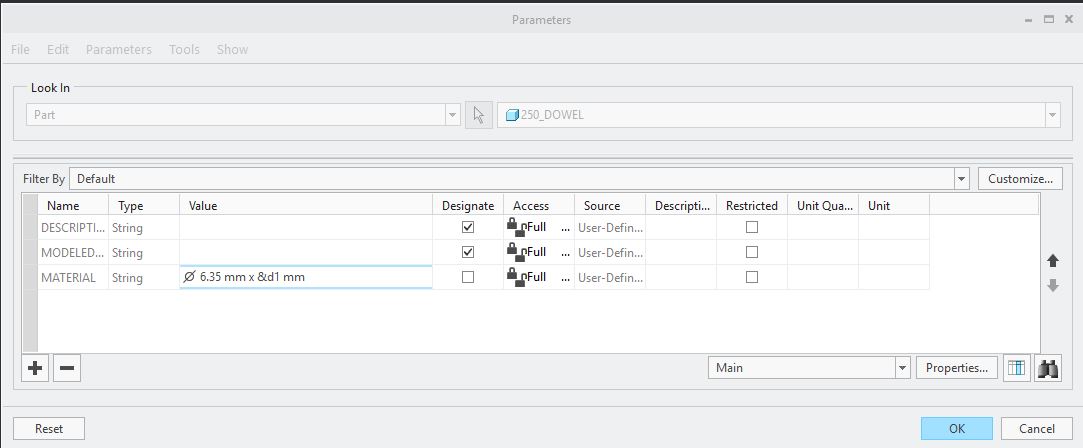


Capture.JPG

Best answer by MartinHanak

Hi,

if length is always integer value, then you can apply following relation

MATERIAL = "ø 6.35 mm x " + itos(d1) + " mm"

MH

2 replies

23-Emerald III
March 22, 2017

d1 is a value, not a string. You will have to convert it to a string.

There have been many topics in the Community on doing this. Here are just 2:

Converting Real Numbers to Strings

How To: Format a real number relation in a note?

24-Ruby III
March 23, 2017

Hi,

if length is always integer value, then you can apply following relation

MATERIAL = "ø 6.35 mm x " + itos(d1) + " mm"

MH

bjoyner1-VisitorAuthor
1-Visitor
March 23, 2017

Thanks for the help.  That worked perfect for me.

If you wouldn't mind is there a way to control the decimal places?

It is rounding my d1 value to the nearest whole number.

24-Ruby III
March 23, 2017

Hi,

see links provided by Ben Loosli.

MH