

1-Visitor
March 29, 2016
Question

Apply Drawing Update 2202279

  • March 29, 2016
  • 3 replies
  • 1659 views

Trying to figure out the new Text Note Feature Control Frame.  For legacy drawings PTC suggests applying drawing update 2202279.  PTC neglects to tell you how to do this.  Does anyone know?
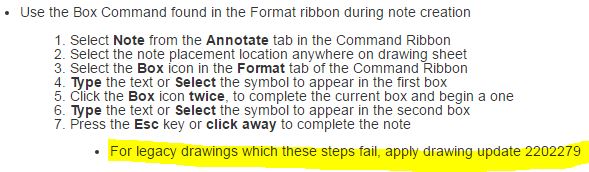
Apply drawing update 2202279.JPG


This thread is inactive and closed by the PTC Community Management Team. If you would like to provide a reply and re-open this thread, please notify the moderator and reference the thread. You may also use "Start a topic" button to ask a new question. Please be sure to include what version of the PTC product you are using so another community member knowledgeable about your version may be able to assist.

3 replies

StephenW
23-Emerald III
March 29, 2016
Pieface1-VisitorAuthor
1-Visitor
March 29, 2016

Thank you, I found this information specifically for 2202279 which fixes the following Text Note GD&T:

GDT_Update_2202279.JPG

1. Open the drawing in Creo

a. Select File>Prepare>Drawing Properties

b. Under Detail Options, select change

i. In the Option field, enter update_drawing

ii. In the Value field, enter 2202279

c. Select Add/Change>Apply>Close

d. Close the Properties Window

2. In the Review tab of the drawing

a. Select Update Sheets

17-Peridot
March 29, 2016

Thanks for spelling that out for us, Don.