

1-Visitor
January 12, 2016
Solved

Assembly questions

  • January 12, 2016
  • 4 replies
  • 1982 views

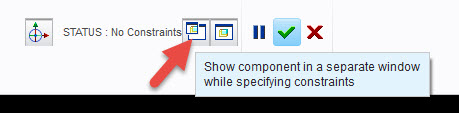
Please does anyone remember how to open a separate part window in an assembly model, A small window for the active part being assembled that comes up on the assembly screen, it helps to make it easy to pick features in a part where their is a cluster in the assembly.


This thread is inactive and closed by the PTC Community Management Team. If you would like to provide a reply and re-open this thread, please notify the moderator and reference the thread. You may also use "Start a topic" button to ask a new question. Please be sure to include what version of the PTC product you are using so another community member knowledgeable about your version may be able to assist.
Best answer by GaryLinscheid

Use this button in the dashboard.

1.jpg

4 replies

15-Moonstone
January 12, 2016

Use this button in the dashboard.

1.jpg

12-Amethyst
January 12, 2016

In the model tab, select assemble, <select the component/assembly>

a new tab will open - component placement

there will be two window icons toward the right side, select the first one.  this will open the component in a seperate window

cp2, M180 with ootb menu

ron

18-Opal
January 21, 2016

Hi Emmanuel,

Did one of these responses answer your question?  If so, please mark it as the Correct Answer, to close the loop and provide a solution for other users who may search for the same question.

Thanks,

Amit

1-Visitor
January 22, 2016

Thank you all. (Gary, Ron, and Amit). your answers rightly answered my question. I had been playing with it for a while and kind of stumbled on the answer by myself but thank you guys anyway.

Emmanuel.