1-Visitor
March 6, 2018
Solved

Can't remove material

  • March 6, 2018
  • 2 replies
  • 21450 views

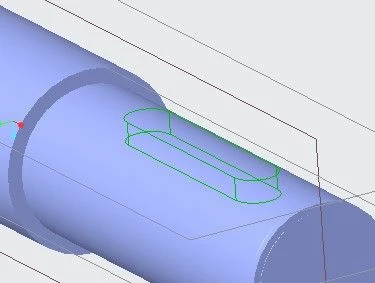
 I have a problem with removing material in Creo Parametric 4.0.

The plane on which the sketch is located is tangent to the cylindrical surface below.

When I press OK, nothing happens. I have a similar problem with revolving.
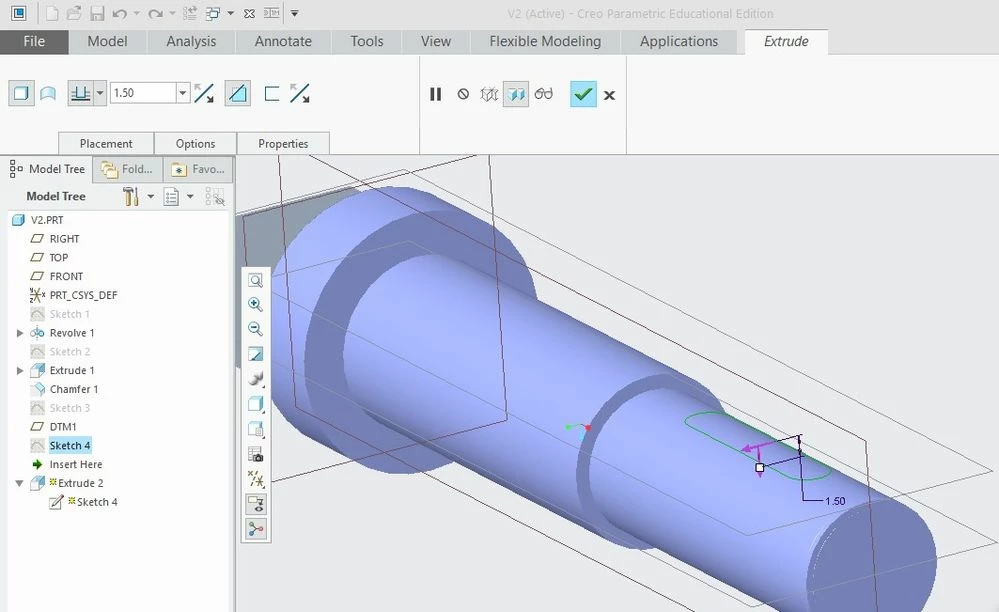
Screenshot_1.jpgScreenshot_2.jpg

Best answer by TomD.inPDX

Change your extrude type to surface.  It is set to solid and it has nothing solid to subtract from.

2 replies

1-Visitor
March 7, 2018

My first inclination is there is a accuracy problem that prevents Creo from identifying an intersection. The easy fix is to make the cut bi-directional so that the cut starts outside the part by a small amount.


I am curious about why there are extra edges at the end of the part; there should be one circle, but I see two more white edges.


Is it possible that when you revolved the feature you created a surface?

vlaki111-VisitorAuthor
1-Visitor
March 7, 2018
Yes, I revolved it as surface.
Thanks a bunch!
17-Peridot
March 7, 2018

Change your extrude type to surface.  It is set to solid and it has nothing solid to subtract from.