

12-Amethyst
February 4, 2019
Solved

Change position of part parameters

  • February 4, 2019
  • 3 replies
  • 6627 views

Hi guys,


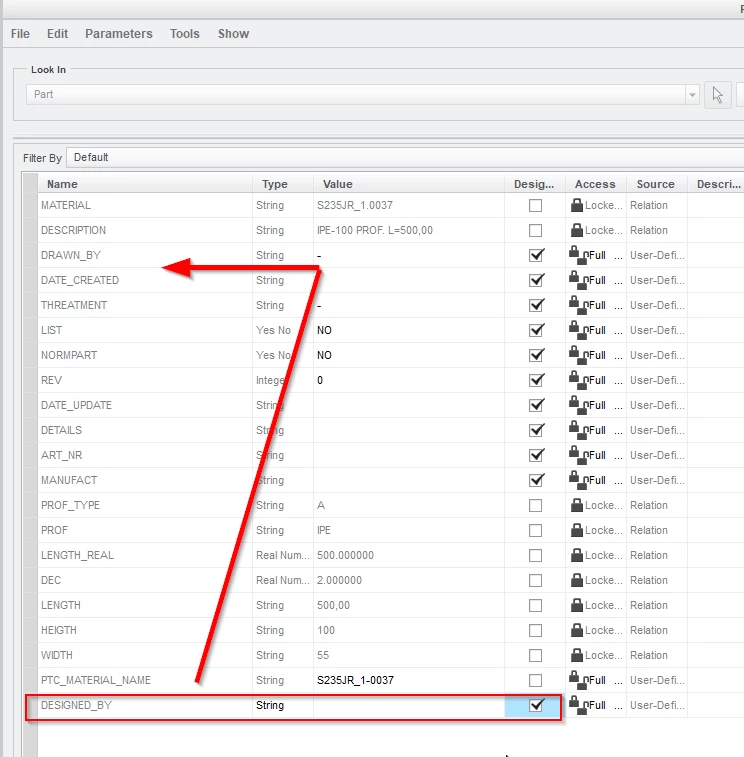
I'm having some exsisting parts and assemblies in Creo3.0, these parts do have parameters. Now I'd like to create some new parameters in these parts. When I open the parameter-list, the existing parameters are sorted in the way they have been created. But now I'd like to put some parameters in between some existing parameters. Does anyone know how to do that, without deleting and recreating the existing parameters?
 

designed_by_parameter.png

Best answer by John.Pryal

Hello, am i missing something here? If all you want to do is move up a newly created parameter then use the arrow keys at the right hand side. See attached image.


John

3 replies

KenFarley
21-Topaz II
February 4, 2019

By default they are sorted by their order of creation, I guess. You can change the order by clicking on the different columns, and they'll be sorted by the column in ascending or descending order. You can't "insert" a new parameter between two others, but with the ability to sort, maybe it doesn't matter.

12-Amethyst
February 4, 2019

Hi Ken,


thanks for your reply. I already did know that we can sort them. But the problem is that we are used to have them in orde of creation (without any sorting filter). And we like this orde, but we only want to have one parameter in between the others...

23-Emerald III
February 4, 2019

One thing I noticed is that the columns can be sorted 3 ways, not just up and down. The third display method is by your display order, so you can toggle between alphabetic sorted and display sorted.When the display is display sorted, there is no arrow next to the word 'Name' in the header.

24-Ruby III
February 4, 2019

Hi,

click Name column header to sort the list.

sort.png

12-Amethyst
February 4, 2019

Hi Martin,


thanks for your reply. But this is the same as Ken is proposing. Problem is that this isn't the solution we are looking for...

13-Aquamarine
February 4, 2019
Instead of the default "Filter_By" create a new one and order to your own liking...
1-Visitor
February 4, 2019

Hello, am i missing something here? If all you want to do is move up a newly created parameter then use the arrow keys at the right hand side. See attached image.


John

12-Amethyst
February 4, 2019

Hi John,


Great, I think that's the answer I was waiting for Smiley Happy

Thanks a lot. This will help me a lot!