13-Aquamarine
August 17, 2017
Solved

Changing text width factor - Creo 3

  • August 17, 2017
  • 1 reply
  • 5132 views

In Creo 2 and older (i.e. the 'old' drawing note / text editor), I could easily switch to the formatting tab within the editor dialogue box and alter the text width factor (typically when my change note was just a couple of characters too long for the change table column).


With the WYSIWYG editor in Creo 3, I can't find a way to change the width factor of a note or table cell directly.  The only way I've found is to create a new text style, then apply it to my note.  This is particularly tedious because it doesn't save the link; if I want to change it again (trial and error), I have to modify the style and then re-apply it to the note.


Have I missed a hidden tool somewhere?
Best answer by pushkarkhanna

Hi Jonathan

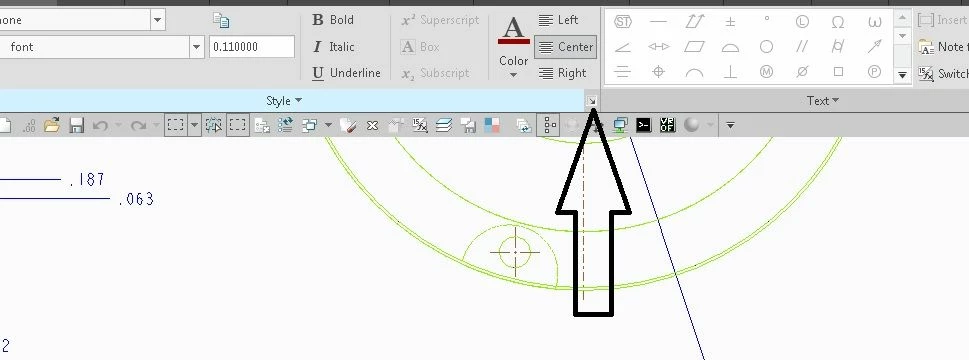
In the format tab>style group there is a liitle right pointed arrow for edieting the text style on bottom right


format.jpg

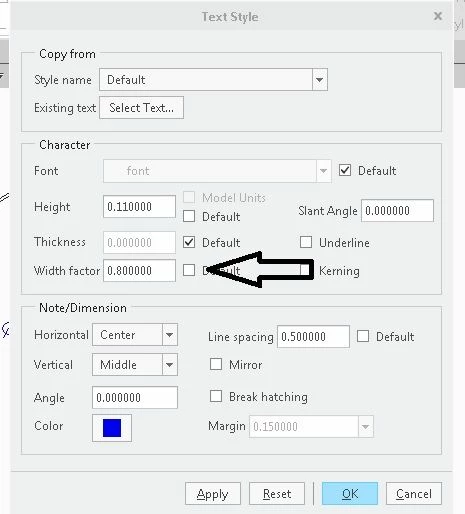
clicking on this button pops up old style text format editor, with width factor 


format2.jpg


Regards

Pushkar

1 reply

14-Alexandrite
August 18, 2017

Hi Jonathan

In the format tab>style group there is a liitle right pointed arrow for edieting the text style on bottom right


format.jpg

clicking on this button pops up old style text format editor, with width factor 


format2.jpg


Regards

Pushkar

5-Regular Member
May 7, 2019

Hi , 


I was following the mentioned way to change width factor of a note. While we are able to change the width factor of an entire note at once, but if I want to change width factor only of a certain part of text in a note, then how to do it ?   This was possible in Creo 2, but I am unable to do it here in Creo 3 .  When I select a part of text in note , the little right pointed arrow for editing the text style on bottom right is grayed out.


23-Emerald III
May 7, 2019

BEFORE selecting the text, in the annotate tab, select TEXT STYLE, then pick the lower line of text you wish to change the formatting of