1-Visitor
July 7, 2015
Solved

component display

  • July 7, 2015
  • 2 replies
  • 2790 views

Hello,


Is there a way to tell a subassembly to by hidden in each assebly drawing but shown in BOM automatically?


Thanks in advance


T


This thread is inactive and closed by the PTC Community Management Team. If you would like to provide a reply and re-open this thread, please notify the moderator and reference the thread. You may also use "Start a topic" button to ask a new question. Please be sure to include what version of the PTC product you are using so another community member knowledgeable about your version may be able to assist.

Best answer by Chris3

Layers can be turned on and off for individual views. Click the arrow shown below and the pick a view.

Capture.PNG

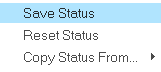
Change the layer status and right click to save the status

Capture.PNG

This only works on a view by view case.

2 replies

Chris3
21-Topaz I
July 7, 2015

There are several ways to do this:

1. You could put the component on a layer and turn the layer off

2. You could use component display to hide the component (layout -> component display for Creo 1.0 and up)

3. You could have a different simp rep for the view than for the BOM table

Each one of these has trade offs. Alternatively if it is something like epoxy or paint, you could add it as a bulk item.

thlavinka1-VisitorAuthor
1-Visitor
July 7, 2015

Hi Christopher,

I made a layer with rules to include desired subassembly.

Now i need to hide the subasm only in one simp. rep. - any idea?

Chris3
Chris321-Topaz IAnswer
21-Topaz I
July 7, 2015

Layers can be turned on and off for individual views. Click the arrow shown below and the pick a view.

Capture.PNG

Change the layer status and right click to save the status

Capture.PNG

This only works on a view by view case.

21-Topaz II
July 7, 2015

There's no way to configure an assembly so that it is always hidden whenever it is assembled into another assembly.

In addition to the options suggested by Christopher, if you have advanced assy, you can use the include function.  It's on the Model tab, in the Component area under the drop-down under "Assemble".  It will place the assy in the model tree but not show it in the graphics area.  It should then be included in your BOM. I'm not sure if it is then included in mass properties calculations, I would assume not.

thlavinka1-VisitorAuthor
1-Visitor
July 7, 2015

Hi Doug,

Thanks for your suggestion,but i cannot try it since it wants an additional licence