


Solved
Create mirrored sheet metal part
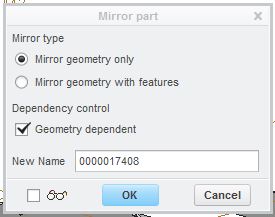
I wish to create a mirrored sheet metal part which will be independent of the original part. Using 'File, Save As', the dialog appears as shown, but the system will not allow me to select 'Mirror geometry with features' and it will not allow me to clear the 'Geometry dependent' check box. Any ideas on how to do this please?
This thread is inactive and closed by the PTC Community Management Team. If you would like to provide a reply and re-open this thread, please notify the moderator and reference the thread. You may also use "Start a topic" button to ask a new question. Please be sure to include what version of the PTC product you are using so another community member knowledgeable about your version may be able to assist.