1-Visitor
March 4, 2015
Solved

Creating a Multiple Chain Sweep

  • March 4, 2015
  • 1 reply
  • 3557 views

I have tried several times to produce a sweep that has multiple chains within the sweep command and have been successful.

As shown by the following image:
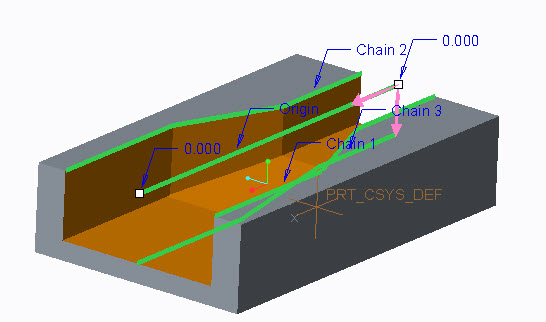
Sweep-2.jpg


When trying to create the same type of sweep using two cylinders, one extruded higher than the other but both extruded from the same datum plane, I cannot get it to work.

See next image.
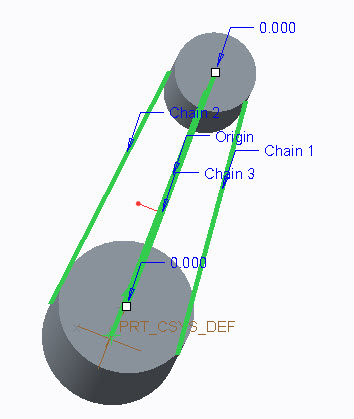
Sweep-3.jpg Sweep-4.jpg

This is what I am trying to achieve. See next image
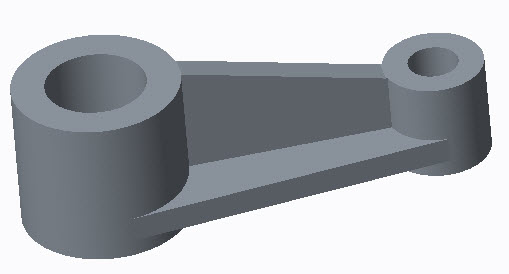
Sweep-5.jpg


Any help would be appreciated.


This thread is inactive and closed by the PTC Community Management Team. If you would like to provide a reply and re-open this thread, please notify the moderator and reference the thread. You may also use "Start a topic" button to ask a new question. Please be sure to include what version of the PTC product you are using so another community member knowledgeable about your version may be able to assist.
Best answer by dschenken

Imagine there is a plane that is perpendicular to each point along the origin trajectory. That plane needs to intersect the additional trajectory chains. In this part, where the large cylinder is, the additional trajectory chains do not cross or lie on the plane for the initial start point.

Change the primary trajectory to be coplanar with the start points of Chain 1 and Chain 2 trajectories.

1 reply

dschenken1-VisitorAnswer
1-Visitor
March 4, 2015

Imagine there is a plane that is perpendicular to each point along the origin trajectory. That plane needs to intersect the additional trajectory chains. In this part, where the large cylinder is, the additional trajectory chains do not cross or lie on the plane for the initial start point.

Change the primary trajectory to be coplanar with the start points of Chain 1 and Chain 2 trajectories.

dprobst1-VisitorAuthor
1-Visitor
March 4, 2015


Hello, David

Thanks for the information. I will try it out and let you know.

dprobst1-VisitorAuthor
1-Visitor
March 4, 2015


Hi David,

I did place all starting points on the same plane and made sure the ending points were also the same, but it still will not sweep correctly.

I have attached another image of what I get. I will says this much. If I draw a straight line from point to point on the bottom and then draw an arc (from each point) from the end of the line to the point at the top, it will sweep with no problem.

Just to clarify, I am trying to sweep a "Tee" cross section.

Sweep-with-all-points-on-plane.jpg

Here is the same part but with a different cross section and it sweeps fine.

Sweep-Arc.jpg