


Solved
Creo 2.0 - Datum Planes (older version vs. newer version)
All,
I have spend many hours trying to figure out how to change a Datum Plane feature in the drawing mode; such as, verifying the older Datum plane option is active, etc,.....
In a model and drawing mode, the Datum Plane feature behavior is different.
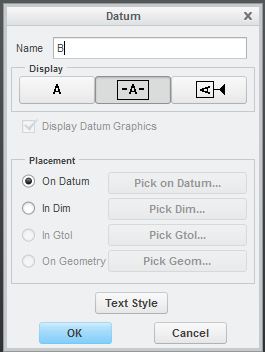
In the model mode, I have 3 options for a Datum Plane feature as shown below.
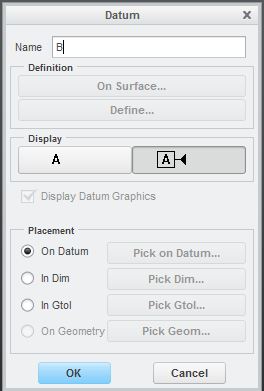
While in the Drawing mode, I only 2 options
Trying to present the Datum Plane on the drawing using the older version. in the image below, I want to use the type on the left NOT the right. (I created this image for show only).
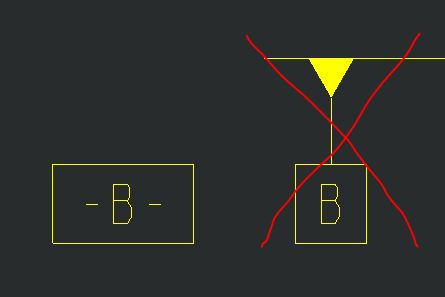
Any suggestions how to get the Datums to appear on the left on a drawing???
Would appreciate any input, thank you
This thread is inactive and closed by the PTC Community Management Team. If you would like to provide a reply and re-open this thread, please notify the moderator and reference the thread. You may also use "Start a topic" button to ask a new question. Please be sure to include what version of the PTC product you are using so another community member knowledgeable about your version may be able to assist.