

16-Pearl
July 10, 2018
Solved

Creo 4 Rendering

  • July 10, 2018
  • 9 replies
  • 8154 views

All,


Ok...on 4.0. I looked at some stuff online about render button gone. See it's in the shaded with reflections? Render options for ambient occlusion and scene background. Under view there are "scenes".


I don't really see any breakdown of this new environment, especially from the users. Hence, this post.


So I toy around with this set of tools that seems like a watered down capability now, leaving me thinking I really want photo-realistic rendering. But of course its another license.


In "scenes" I can get reflections per the samples. But background remains plain. So I mess with  "ambient occlusion and scene background" and not much change. What am I missing here?


Not at all what I am used to.


Is it true that id we want anything decent we have to fork over the dough?


Wayne
Best answer by Chris3

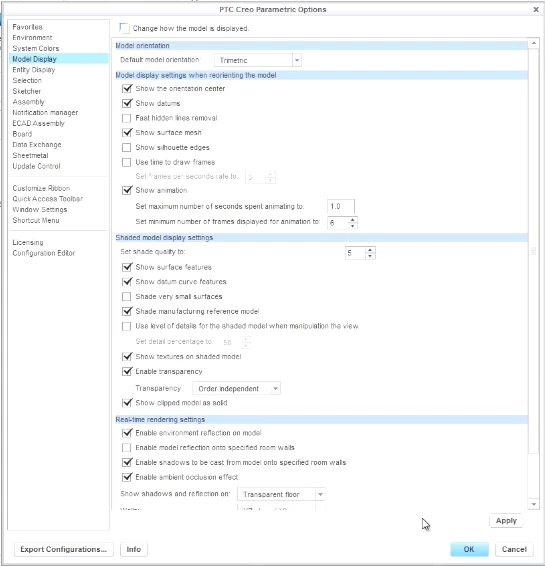
If you can't see the real time render settings under the model display options then you don't have the license for ambient occlusion.


Capture.PNG

9 replies

Chris3
Chris321-Topaz IAnswer
21-Topaz I
July 10, 2018

If you can't see the real time render settings under the model display options then you don't have the license for ambient occlusion.


Capture.PNG

wfalco16-PearlAuthor
16-Pearl
July 11, 2018

Ah, good process of illumination!


This would be part of photo-realistic rendering right?


So..am I right in saying I now have less than I did on 3.0...and its a shakedown to buy?

Chris3
21-Topaz I
July 11, 2018

Yes it is part of the rendering (KeyShot) module that you have to buy. PTC loves to talk up new features with their marketing but then leave out the fact that you have to buy additional modules to gain access.


If you had the rendering module in Creo 3 then you just need to get it upgraded to work with Creo 4. If you didn't have the rendering module in Creo 3 then I don't think you have lost anything.