23-Emerald III
February 15, 2017
Solved

Creo 4: Section lines wrong

  • February 15, 2017
  • 3 replies
  • 3395 views

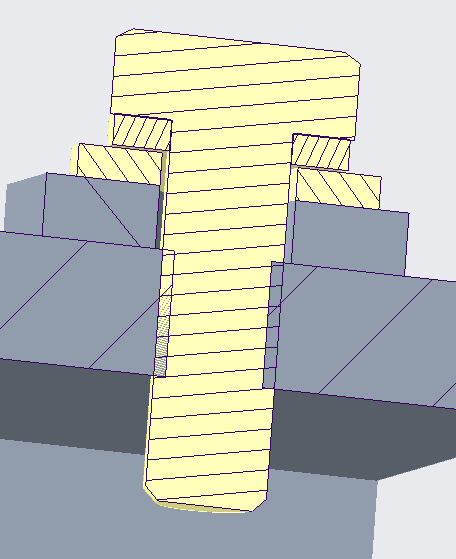
I did a quick section view in Creo 4, placed it on my drawing and the crosshatching is wrong.
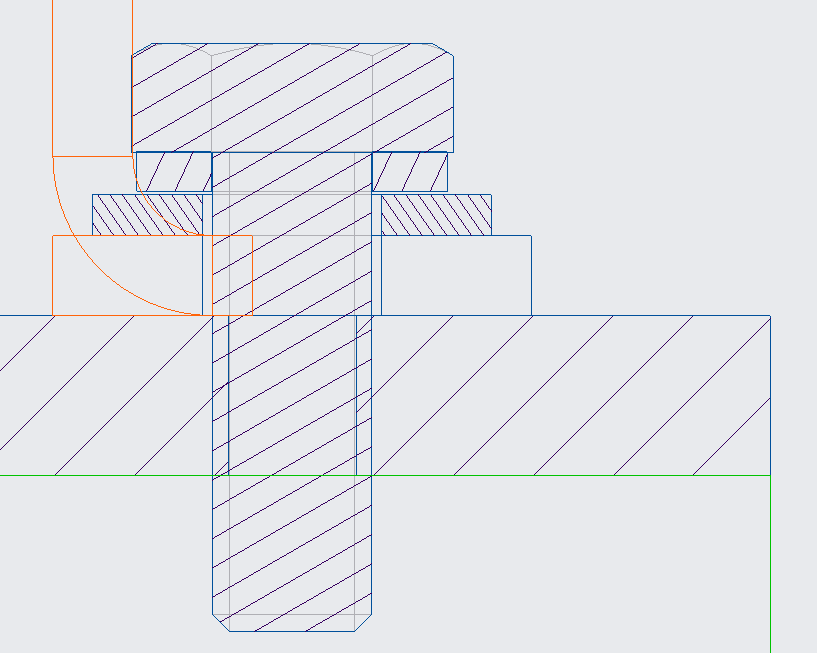
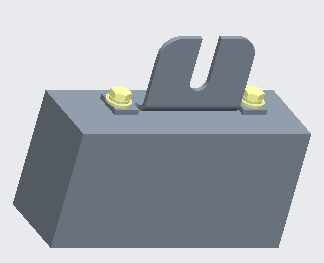
The parts from top down are: bolt, lock washer, flat washer, bracket and box. The bracket is not cross-hatched and should be in the drawing.

The left view is from the drawing, the right view from the assembly model. Bottom view is the whole assembly.

Creo 4 F000

Best answer by TomU

Also, when you step through the hatching on the drawing, does that bracket highlight?  If so, can you reduce the hatching size?  Maybe it's so large that none of the lines are visible in the hatched area...

3 replies

23-Emerald IV
February 15, 2017

Cross hatching generally does not work correctly where there are interferences.  Does the hatching work correctly if you enlarge the hole in the box so it doesn't interfere with the bolt (just for testing)?  Are there any other interferences?

BenLoosli23-Emerald IIIAuthor
23-Emerald III
February 15, 2017

The problem with changing the box hole is that it is the tap drill size for the1/4-20 bolts holding the bracket to the box.

The software seems to handle the bold/box interference just fine.

23-Emerald IV
February 15, 2017

It was just a suggestion to see if removing interferences has any impact on hatching.  Obviously don't leave it that way.

TomU23-Emerald IVAnswer
23-Emerald IV
February 15, 2017

Also, when you step through the hatching on the drawing, does that bracket highlight?  If so, can you reduce the hatching size?  Maybe it's so large that none of the lines are visible in the hatched area...

BenLoosli23-Emerald IIIAuthor
23-Emerald III
February 15, 2017

When I step through the hatching, I got the part to highlight, but the only option available was angle, no distance setting like the other parts. I did get a single hatch line to appear at 30 and 60 angles.

23-Emerald IV
February 15, 2017

I'm not sure I have the correct answer if you can't reduce the hatching size...

23-Emerald III
February 15, 2017

Are you testing Creo 4? Is it acceptable in Creo 3?

Occasionally by default, the x-hatching is too big for a part but I don't remember ever seeing the hatch spacing option missing on a part.