

1-Visitor
February 21, 2018
Solved

CREO 4 - Snap dimension line to an edge

  • February 21, 2018
  • 1 reply
  • 4328 views

Hello


I'm looking for a small but nice feature that I was using with CREO 2 but it seems to have disappeared from CREO 4.


In CREO 2, we could select a witness line (by the small white square at his base), hold "SHIFT" key and move the cursor along an edge: this would automatically place the witness line base at the end of the edge if the line was parallel to the edge or on this edge in other cases.
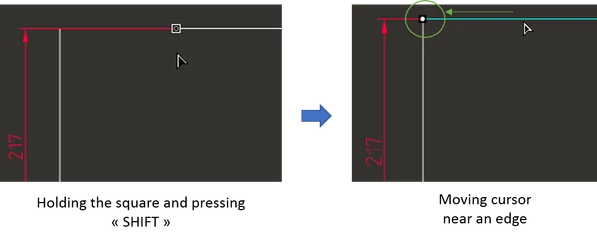
Picture2.png

By the way, press the key "shift" + click on the white square of a witness line will lock its position (a small black circle appears).


Does anyone know if this is still possible with CREO 4?


Thanks Smiley Wink


Best answer by John.Pryal

This feature still appears to work in Creo 4, it certainly does in Creo 3. One thing that has always baffled me a little though is the gap that is left between the end of the wittness line & the vertex you have just snapped to. On some drawings i get a good sized gap, perhaps 2mm then on others virtually no gap. I suspect that their is a drawing config that controls this but i find it bizzare that all my drawings are controlled by the same config files & yet i see different behaviour.

1 reply

1-Visitor
February 21, 2018

This feature still appears to work in Creo 4, it certainly does in Creo 3. One thing that has always baffled me a little though is the gap that is left between the end of the wittness line & the vertex you have just snapped to. On some drawings i get a good sized gap, perhaps 2mm then on others virtually no gap. I suspect that their is a drawing config that controls this but i find it bizzare that all my drawings are controlled by the same config files & yet i see different behaviour.

1-Visitor
February 21, 2018

Ok thank you for your quick reply, I will investigate why it's not working on my system...


About the gap, look at this option in drawing option ( / iso.dtl file) maybe it could help. That also why I like this feature, we can make clean and nice drawings (I'm a little manic Smiley Very Happy)

witness_line_offset
1-Visitor
February 21, 2018

I have that option set to 1.5 in my dtl file & it definitely is that for any new drawing & new dimensions created. Perhaps when i encounter zero gap an old dtl file is being used, i will check next time i see this.

Strange that the snapping is not working for you.