

1-Visitor
September 1, 2015
Solved

Creo2 : Customization note in drawing mode

  • September 1, 2015
  • 4 replies
  • 1619 views

When i create a new note with an arrow, automaticaly the note appear with the reference line on the top of this note. Is it possible to specify that I want the reference line at the bottom of the note ?


This thread is inactive and closed by the PTC Community Management Team. If you would like to provide a reply and re-open this thread, please notify the moderator and reference the thread. You may also use "Start a topic" button to ask a new question. Please be sure to include what version of the PTC product you are using so another community member knowledgeable about your version may be able to assist.
Best answer by rcook

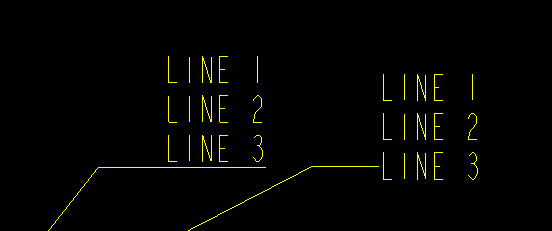
If you don't want the note underlined like what happens when you "Toggle Leader Type", you can also add "@O" at the beginning of the line that you want the leader to go to.

On left is "Toggle Leader Type". On the right, there is an "@O" in front of "LINE 3".

note.jpg

4 replies

12-Amethyst
September 1, 2015

Select your note then RMB and select "Toggle Leader Type"

rcook1-VisitorAnswer
1-Visitor
September 1, 2015

If you don't want the note underlined like what happens when you "Toggle Leader Type", you can also add "@O" at the beginning of the line that you want the leader to go to.

On left is "Toggle Leader Type". On the right, there is an "@O" in front of "LINE 3".

note.jpg

ldrutel1-VisitorAuthor
1-Visitor
September 2, 2015

Great, thank you

Mahesh_Sharma
22-Sapphire I
September 4, 2015

Laurent,

You may mark Roger's reply as correct answer for the post.