10-Marble
January 19, 2022
Solved

Curve by equation / motion skeleton

  • January 19, 2022
  • 3 replies
  • 23103 views

Hello!

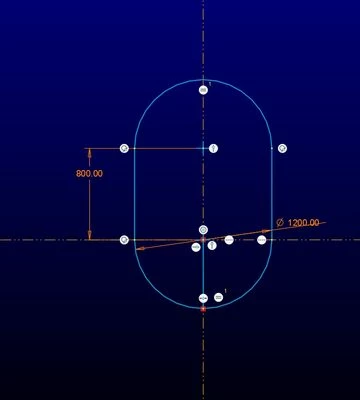
I need help to define curve with equation. I have simple loop as shown in the attachment.

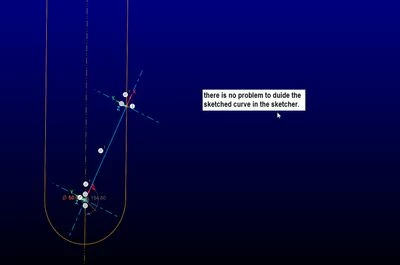
I have the problem to guide a point /curve) on the loop.

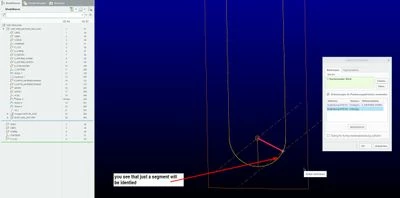
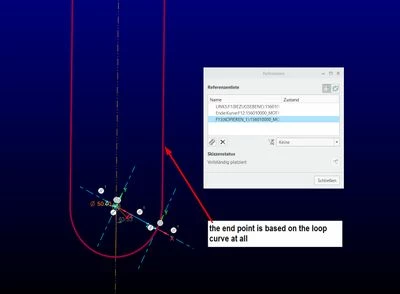
Although, I use the loop curve at all as reference (and not jus a segment) and I can quide the point in the sketcher, the loop will be not  identified by the motion skeleton.

I suppose, that if the curve is generate by equation, maybe it will run.

Can somebody write the equation for this loop?

Thank you!

curve.jpg

motion.jpg

ref.jpg

ske.jpg

Best answer by sacquarone

Hello @PI_6131154 


The way how you are tring to approach this cannot work directly, because would assume system being able to handle simulatenously:

  1. The Drag you want all along the curve (and currently, in your files, the reference of the slot connections can be only one arc -or a sgement - but not the whole curve)
  2. And especially, an "update" you would expect of the External Copy Geometry "shape" along drag operation (based on positions of points, on the arcs or on the segments)

And point 2 is not possible. Internal features of a given component is not supposed to change upon drag process (there is "no regeneration" upon "Drag" for obvious performance reasons). Only way to "change geometry of a component", based on assembly conditions, would be the notion of Flexibility, but related to that:

  • I do not see any "good definition" which may be configured to satsify your constraint as par of the Flexibility Definition
  • Even if there was one, a moveable or flexible component, such as springs, hinges, skeleton parts, or datums lock the referenced components to form one rigid body during dragging operations => Documented in Help Center here.

Above are all the reasons why I would approach this differently, using one single object (either a part or a skeleton) for each link of the chain. Better than a long explanation, I registered in attached movie (with sound for explanations ... sorry for my "french" accent) illustrating my suggestion for this use case.


Far from being sure that it's the best solution (if anyone has better ideas, thanks in advance to share them here), I hope this will help you at least a bit to make some progress in your ongoing project.


Regards,


Serge

 

3 replies

21-Topaz I
January 19, 2022

Hello @PI_6131154 


Looks more like a "math" question more than one related to CreoParametric capabilities. I searched in this direction but failed to find any Cartesian or Cylindrical equation producing this kind of geometry. Related to that:

  • This post gives a list of useful equations to produce different shapes, but unfortunately none speaking about "slot holes"
  • I "Google-searched" in this direction, but failed to find any relevant information on an eventual equation able to produce this kind of geometry in planes

So, if anyone has an idea on how this equation can be built (X & Y, with zero Z), any suggestions are more than welcome.


Otherwise, why not approaching this with:

  1. A simple sketch curve (the one you did, but without the datum point & CSYS)
  2. Create the Datum Point on curve (+ evetual other things like an axis and a CSYS based on point later if needed)?

Approaching this as suggested above will allow you to:

  • Create the Datum Point referring the whole curve (and not the single sketched entities)
  • Control exactly where should be the "Start" (by dragging the point where you want all along the whole curve)
  • Control if you want a "ratio" or a "real distance" (from the "Start") for the location of the Datum Point along this given sketched curve


Regards,


Serge


tbraxton
22-Sapphire II
22-Sapphire II
January 19, 2022

If I understand what you are trying to do it can be accomplished using a slot constraint. This video demonstrates using a motion skeleton to define a motion path to constrain a component. The Creo 4 models are enclosed for reference if this is what you are trying to do. The key is to manually select all segments of the curve needed when defining the slot connection point on line constraint.


10-Marble
January 19, 2022

Hi! 

Thank you very much for the proposal! It is hi interesting.

But I wish to have my design 100% as curves i the skeleton. At least I wish to design the chain-well (it will be 4 "pins" weel). That is way I try to do all from the scratch.

I have record what should be possible to do with the drag hand.

And further more, I wish also to have rotated well, but this I suppose will be hard.


tbraxton
22-Sapphire II
22-Sapphire II
January 19, 2022

Your video looks like a chain drive or vehicle track from a kinematic perspective.  I do not see any reason why you cannot do it with models that contain curves and datums rather than solid geometry. Keep in mind that motion skeletons may or may not be the best way to get there. You have the option to connect multiple skeletons (representing solid bodies in the mechanism) connected using mechanism constraints. It can be argued that this is a best practice for a top-down approach to mechanism design in Creo. This would bypass the application of a motion skeleton.


I think you may find this video useful as a guide.


https://www.youtube.com/watch?v=eFmXf52gbok 

19-Tanzanite
January 20, 2022

?? you want a parametric equation for a slot?  I've a feeling that is something that involves infinite number of terms to achieve the exact result.  Anyway, all this wrangling to get the motion skeleton to behave.  As if there is a chance... Have you verified that your motion skeleton works with a curve from equation, for example an ellipse?

pausob_0-1642647393425.png


I'm open to hear something that makes me change my mind, but I think motion skeletons are an obsolete, 2D technology that no one uses and PTC isn't maintaining anymore.  I would stay away from them.  Top-down skeletons and mechanism connections are not mutually exclusive - please see https://www.youtube.com/watch?v=rxHTBj7Ukd8

10-Marble
January 20, 2022

Hi!

Thank you for the video! It is very close to this what I wish to do.

First...yes, motion skeleton works with curve done by equation. I have checked this.

Second....I do not belive that motion skeleton is obsolet. It is technic not to much in use.

At least, until I do not made all important kinematik design works, I do not like to make solid models.

The Video should be ok, but in my case the guiding around do loop schuld stack becaouse on the same reason.


We stil to look for way for quiding  pont on loop what is working in the sketcher, in the motion skeleton and even more: to represent wheel with drag possibiliti and the will move the point on the loop.

Maybe we have to use also some relations for length as "way" for the  wheel rotation as "way" length vor the moving of the point on the loop.

21-Topaz I
January 21, 2022

Hello @PI_6131154 


The way how you are tring to approach this cannot work directly, because would assume system being able to handle simulatenously:

  1. The Drag you want all along the curve (and currently, in your files, the reference of the slot connections can be only one arc -or a sgement - but not the whole curve)
  2. And especially, an "update" you would expect of the External Copy Geometry "shape" along drag operation (based on positions of points, on the arcs or on the segments)

And point 2 is not possible. Internal features of a given component is not supposed to change upon drag process (there is "no regeneration" upon "Drag" for obvious performance reasons). Only way to "change geometry of a component", based on assembly conditions, would be the notion of Flexibility, but related to that:

  • I do not see any "good definition" which may be configured to satsify your constraint as par of the Flexibility Definition
  • Even if there was one, a moveable or flexible component, such as springs, hinges, skeleton parts, or datums lock the referenced components to form one rigid body during dragging operations => Documented in Help Center here.

Above are all the reasons why I would approach this differently, using one single object (either a part or a skeleton) for each link of the chain. Better than a long explanation, I registered in attached movie (with sound for explanations ... sorry for my "french" accent) illustrating my suggestion for this use case.


Far from being sure that it's the best solution (if anyone has better ideas, thanks in advance to share them here), I hope this will help you at least a bit to make some progress in your ongoing project.


Regards,


Serge