

1-Visitor
August 20, 2018
Solved

Custom IFX Nut Issue

  • August 20, 2018
  • 3 replies
  • 2636 views

We just purchased IFX licenses and I am working on our setup.  I have successfully created the files for screws and I am able to populate the menus for different types of screws.  Now I am trying to create the files necessary for nuts.  I am setting this up for Creo 5.0.1.0.  I have created a custom directory for our IFX data.  In that directory, I have files named Excel_ScrewType_20.dat.  This file works.  I created a similar file named Excel_NutType_1.dat.  
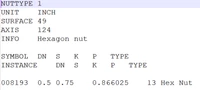
IFX Nut File.png


I then modified the IFX catalog file as shown in the screenshot below.
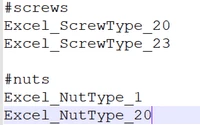
IFX Fastener Catalog.png

When I restart Creo and insert screws using IFX, the nut option is grayed out.  What am I missing in my setup?


Matt

This topic has been closed for replies.
Best answer by munruh

I removed the last column from my nuttype file.  After doing that, I was able to get it to work.


Matt

3 replies

24-Ruby III
August 21, 2018

I hope @OliverGräbner will help you.

17-Peridot
September 10, 2018

Hi Matt,


can you send me your fastener files, please. Then I can review it.

You can send it directly to me: oli@buw-soft.de


Regards,

Oli

munruh1-VisitorAuthorAnswer
1-Visitor
September 11, 2018

I removed the last column from my nuttype file.  After doing that, I was able to get it to work.


Matt