

1-Visitor
April 13, 2017
Solved

Datum Display Filters

  • April 13, 2017
  • 2 replies
  • 5069 views

Up on the mini-ribbon, there's a drop down that controls axis, point, csys and plane display.

How do I control which ones are on by default when i create a new part?  I'd like for datums to be on by default so I don't have to keep turning it on every time I create a new part and need to extrude, revolve, ect.
Best answer by StephenW

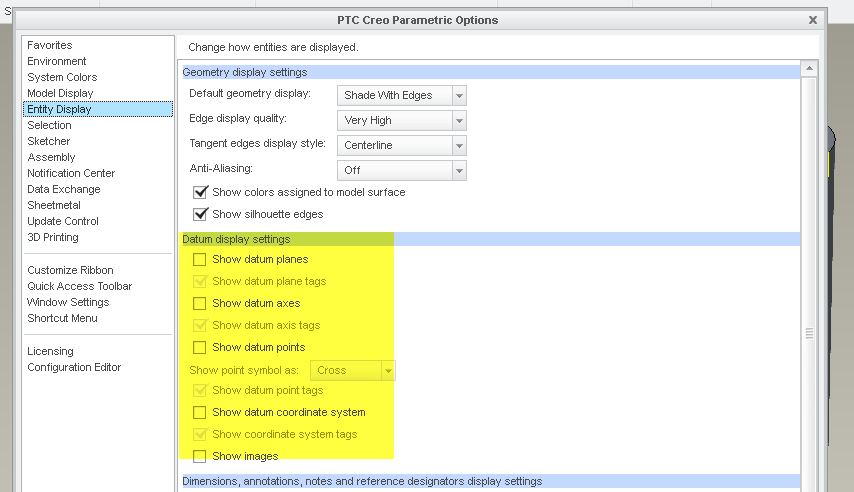
You can set the display options in the config.pro (or easier in the options toggle and save your options).

BUT, that is only for when you start Creo. If you start Creo and turn off datum planes and then you start a new part, the planes will be turned off, since that is how your current environment settings are.

2 replies

StephenW
StephenW23-Emerald IIIAnswer
23-Emerald III
April 13, 2017

You can set the display options in the config.pro (or easier in the options toggle and save your options).

BUT, that is only for when you start Creo. If you start Creo and turn off datum planes and then you start a new part, the planes will be turned off, since that is how your current environment settings are.

erine1-VisitorAuthor
1-Visitor
April 13, 2017

Nice!...  Went into options>entity display> changed settings>exported new settings to config.pro. file.  Restarted CREO, made a new part and there they were.  Thanks! I marked your reply as "correct answer."