


Dale_Rosema
23-Emerald IV
April 3, 2015
Solved

&Dimension in a note

  • April 3, 2015
  • 7 replies
  • 9690 views

I just put some dimensions in a note.

1. MATERIAL = ALUM. &ad69 X &oad957 X &oad969

The interesting thing was that when I put them there, they disappeared on the drawing. To make sure I wasn't going nuts, I cut them out of the notes and the reappeared. I when back and forth several times to make sure I wasn't seeing things.

The dimension are part of ordinate string of dimensions:
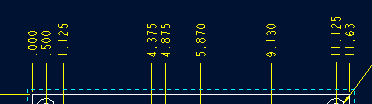
&oad957 is the 11.63 dimension.

Any thoughts or ProWork-arounds.

Dale

Best answer by TomU

Creo will only allow any dimension to be displayed one time in a drawing (all sheets). You can either create a second dimension (drawing dim or reference dim) or you can create a parameter in the model set to the value of this dimension. Parameters can be displayed as many times as you want.

7 replies

TomU23-Emerald IVAnswer
23-Emerald IV
April 3, 2015

Creo will only allow any dimension to be displayed one time in a drawing (all sheets). You can either create a second dimension (drawing dim or reference dim) or you can create a parameter in the model set to the value of this dimension. Parameters can be displayed as many times as you want.

1-Visitor
April 3, 2015

It used to be that if the dimension was used twice in notes and one of them was eliminated it would be available for the drawing again. Perhaps Creo 'fixed' that.