10-Marble
December 3, 2025
Solved

Drawing repeat region if-statement does nothing

  • December 3, 2025
  • 3 replies
  • 421 views

Hi,

is it possible to perform a calculation based on an if-statement in a drawing repeat region relation?

Prerequisite:

Model units: mm Kg s


I would like to multiply mdl_pro_mp_mass by 1000 if model parameter mass_unit is set to g instead of kg.


Something like this:

mass_display = mdl_pro_mp_mass
if mass_unit == "g"
mass_display = mdl_pro_mp_mass * 1000
endif


It's only the IF that doesn't work; the calculation works fine if tested separately.


It works in a Post Regeneration relation in the model (using pro_mp_mass instead of mdl_pro_mp_mass), but I would like to not add the relation in the model.


Tested on both Creo 9.0.3.0 and 11.0.6.0


Any suggestions?


Thanks in advance! 🖖
Best answer by Voronov

Hi
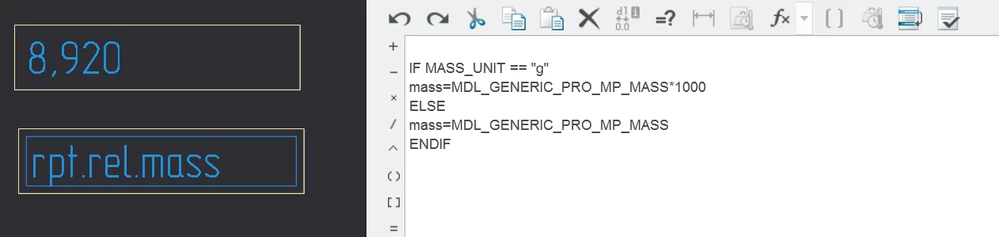
If I understand what you want correctly, try this.

IF MASS_UNIT == "g"
mass=MDL_GENERIC_PRO_MP_MASS*1000
ELSE
mass=MDL_GENERIC_PRO_MP_MASS
ENDIF


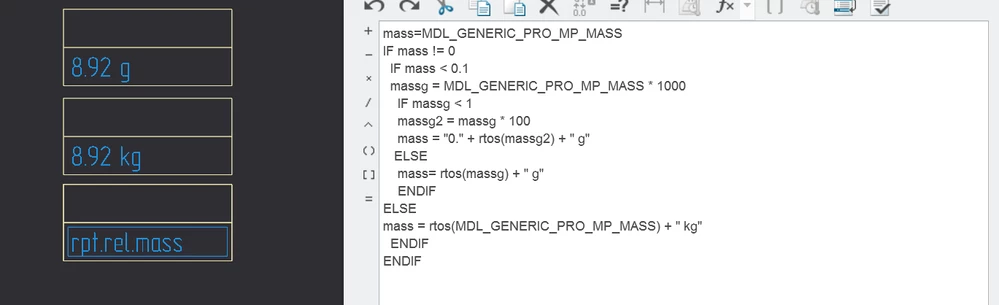
For automatic g/kg switching, I use this


mass=MDL_GENERIC_PRO_MP_MASS
IF mass != 0
 IF mass < 0.1
 massg = MDL_GENERIC_PRO_MP_MASS * 1000
 IF massg < 1
 massg2 = massg * 100
 mass = "0." + rtos(massg2) + " g"
 ELSE
 mass= rtos(massg) + " g"
 ENDIF
ELSE
mass = rtos(MDL_GENERIC_PRO_MP_MASS) + " kg"
 ENDIF
ENDIF

mass.PNG

mass1.PNG


3 replies

24-Ruby III
December 3, 2025

Hi,

I think you can test parameters mentioned in https://www.youtube.com/watch?v=qiQvnxVwUqk video in Creo 11.0.

Note: I have never done such test,

Note: I got the link when I asked Google ... creo model parameter for units

C4DG33K10-MarbleAuthor
10-Marble
December 5, 2025

Hi Martin.
That's nifty but not what I'm looking for.
We don't want to change the model units, just choose a different presented unit on the drawing if the model is very small or have a low mass.

Our models span between parts of a gram (small injection molded polymers) to tens of kilograms (casted and/or turned/milled metal) and would like to present the mass accordingly.

Thanks for the suggestion, will look at it when we update to Creo 11!


🖖

24-Ruby III
December 5, 2025

@C4DG33K wrote:

Hi Martin.
That's nifty but not what I'm looking for.
We don't want to change the model units, just choose a different presented unit on the drawing if the model is very small or have a low mass.

Our models span between parts of a gram (small injection molded polymers) to tens of kilograms (casted and/or turned/milled metal) and would like to present the mass accordingly.

Thanks for the suggestion, will look at it when we update to Creo 11!


🖖


Hi,

after little Google searching I found following link

https://community.ptc.com/t5/3D-Part-Assembly-Design/Reporting-Model-Unit-Information-in-a-Repeat-Region/td-p/447126


Unfortunately this solution requires modification of existing models.

Voronov12-AmethystAnswer
12-Amethyst
December 5, 2025

Hi
If I understand what you want correctly, try this.

IF MASS_UNIT == "g"
mass=MDL_GENERIC_PRO_MP_MASS*1000
ELSE
mass=MDL_GENERIC_PRO_MP_MASS
ENDIF


For automatic g/kg switching, I use this


mass=MDL_GENERIC_PRO_MP_MASS
IF mass != 0
 IF mass < 0.1
 massg = MDL_GENERIC_PRO_MP_MASS * 1000
 IF massg < 1
 massg2 = massg * 100
 mass = "0." + rtos(massg2) + " g"
 ELSE
 mass= rtos(massg) + " g"
 ENDIF
ELSE
mass = rtos(MDL_GENERIC_PRO_MP_MASS) + " kg"
 ENDIF
ENDIF

mass.PNG

mass1.PNG


C4DG33K10-MarbleAuthor
10-Marble
December 8, 2025

Thanks Voronov,

I got it to work with just minor changes to your relation.
I want to use MDL_PRO_MP_MASS instead of the GENERIC.

The weird thing is that I initially started exactly as your first suggestion, but it didn't work.

Now when I pasted your suggestion it worked... Inscrutable are the ways of Creo! 😜


🖖 /C4DG33K

RPN
18-Opal
December 6, 2025

If you read this Repeat Region Relation  , it may help you, but it looks like to have both values in the table, maybe you can hide one column.


Note: Check to display with units, because this is just a unit issue!