

1-Visitor
August 24, 2015
Solved

Drawing Table width and height "As Is"

  • August 24, 2015
  • 1 reply
  • 5622 views

Hello,

I am unable to set value for Height and width property of drawing table "As is". It actually appears into property page as soon as I set it, but once I come back to same again, that value is set to previous value instead of As is.

Thanks and Regards

Ketan


This thread is inactive and closed by the PTC Community Management Team. If you would like to provide a reply and re-open this thread, please notify the moderator and reference the thread. You may also use "Start a topic" button to ask a new question. Please be sure to include what version of the PTC product you are using so another community member knowledgeable about your version may be able to assist.
Best answer by MartinHanak

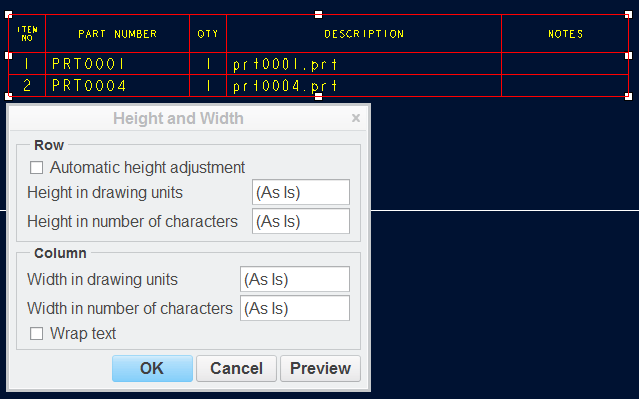
I think that you do not understand the meaning of (As Is) value. (As Is) tells you that selected entities does not share the same property.

For example:

  • your table contains several columns with different width, therefore Height and Width dialog box contains (As Is) value
  • your table contains several rows with equal height 1.0, therefore Height and Width dialog box contains 1.0 value
  • if you change the height of row no.1 one to 2.0, select table and display Height and Width dialog box, the you will see (As Is) value set for rows

p4.png

Martin Hanak

1 reply

24-Ruby III
August 24, 2015

Ketan,

please upload a drawing containing problematic table.

Martin Hanak

1-Visitor
August 24, 2015

Drw file is attached for reference.

1-Visitor
August 24, 2015

Refer Table 5 in sheet 4.