

1-Visitor
February 10, 2016
Solved

edge references

  • February 10, 2016
  • 1 reply
  • 4657 views

Hi

   i am using a check - edge references it is working but the problem is that this check only gives me information of hole which is referenced from edge. i have created a rectangular slot in my model and referenced it from edge,since it is also a feature now after running model check  it is not showing rectangular feature to highlight.


This thread is inactive and closed by the PTC Community Management Team. If you would like to provide a reply and re-open this thread, please notify the moderator and reference the thread. You may also use "Start a topic" button to ask a new question. Please be sure to include what version of the PTC product you are using so another community member knowledgeable about your version may be able to assist.
Best answer by Mahesh_Sharma

Nimesh,

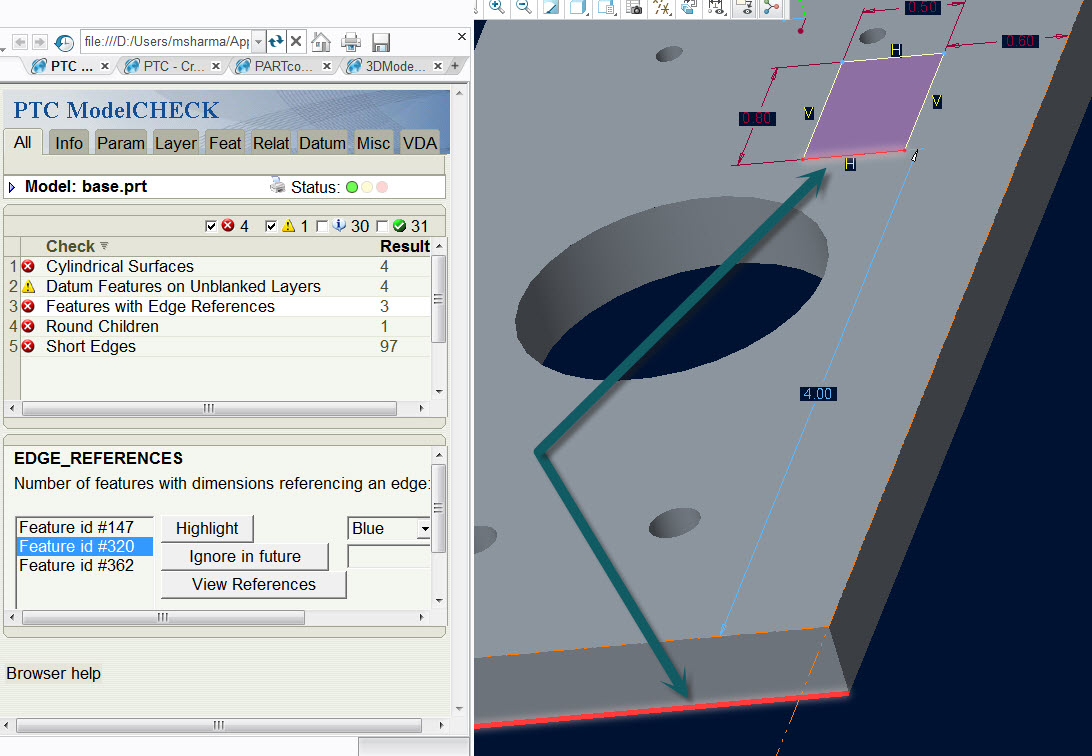
As Stephen mentioned references for slot features are surfaces not to any edges hence no error or warning in ModelCHECK. If you will modify the slot feature and define edges for reference, you will get warning/error.

Edge.jpg

1 reply

Mahesh_Sharma
22-Sapphire I
February 10, 2016

Nimesh,

This check lists features which are created using edges as dimension reference, when creating slot make sure you are referring edge for dimension reference not to any surface. If you have any part to share, we can check this.

ng-21-VisitorAuthor
1-Visitor
February 11, 2016

hi Mahesh,

yes sure i am attaching a model file made in creo 3.0, here is one feature named slot which has reference from edge for a dimension 0.6, during model check it should be appear in ui for highlighting but it is not appearing.

StephenW
23-Emerald III
February 11, 2016

No, your reference is a surface. By default, Creo selects the surface (more stable feature) instead of the edge.  Look at the reference viewer to see exactly what your are referencing.

This feature is modeling correctly assuming you want to avoid edge reference.

not-edge.jpg