

1-Visitor
August 12, 2015
Solved

Export STEP File

  • August 12, 2015
  • 1 reply
  • 14878 views

Morning All

Having issue with exporting an assembly as a STP file and creating a solid.

Have trawled help, forums and interweb for info and I still see the structure of the assembly when I open the STP file in a separate application.

So far  I have shrinkwrapped the assembly then saved the shrinkwrap as a STP file, this opens as a single part but you can still see the structure.

I've tried suggestions such as surface only and the problem remains. We are using Creo 2.0 M120.

Any suggestions?

Many Thanks
Best answer by VladimirPalffy

Hi Phil,

if you need to create a step file without an assembly structure try to use this steps:

  1. Open asm and create flat assembly structure - move all components into main assembly (remove subassemblies) = Restructure components to main assembly
  2. Create a Shrinkwrap model
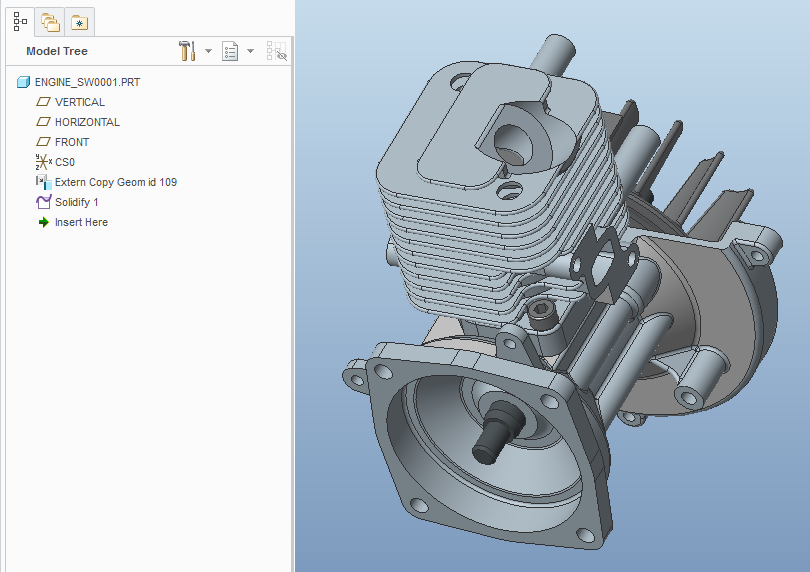
  3. Open the Shrinkwrap
    sw-part.png
  4. Save it as STP (solid+Shells)
  5. Check the STP file - it is only one part / without structure

Regards,

Vladimir

1 reply

14-Alexandrite
August 12, 2015

Hi Phil,

if you need to create a step file without an assembly structure try to use this steps:

  1. Open asm and create flat assembly structure - move all components into main assembly (remove subassemblies) = Restructure components to main assembly
  2. Create a Shrinkwrap model
  3. Open the Shrinkwrap
    sw-part.png
  4. Save it as STP (solid+Shells)
  5. Check the STP file - it is only one part / without structure

Regards,

Vladimir

1-Visitor
February 8, 2019

I tried, however, when the STEP (STP) file is imported by cliking "assembly" it bring all the parts and whole assembly structure is there.  however, i have seen in past that STEP file has only one part of the whole assembly.

will give another try

16-Pearl
February 8, 2019
You can try importing the STEP file as a part instead of assembly (you can do that, simply change import option from Assembly to Part) and then export model to STEP again. That way next time it will be imported as a single part without showing the assembly structure.