1-Visitor
May 13, 2016
Solved

Family table - how to rename the column

  • May 13, 2016
  • 1 reply
  • 9026 views

Hi guys,

I have a question for you. I'm working on one of my projects and I have to use the Family table. First of all, it is important to say, that I didn't prepare the model itself. Someone else made it, and I just have to connect all parts and prepare the Family table for them. I've added all necessary features, however the names of columns corresponding to them are not what I wanted. The problem is that I cannot change these names (cannot rename columns). Did any of you have similar problem and is able to tell me how to do this?

I will be grateful


This thread is inactive and closed by the PTC Community Management Team. If you would like to provide a reply and re-open this thread, please notify the moderator and reference the thread. You may also use "Start a topic" button to ask a new question. Please be sure to include what version of the PTC product you are using so another community member knowledgeable about your version may be able to assist.
Best answer by TomU

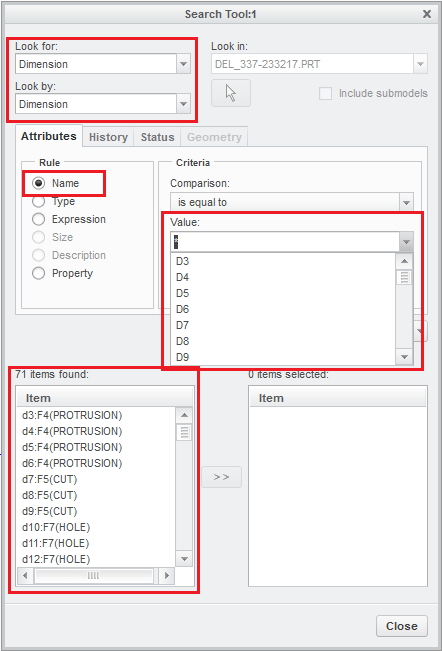
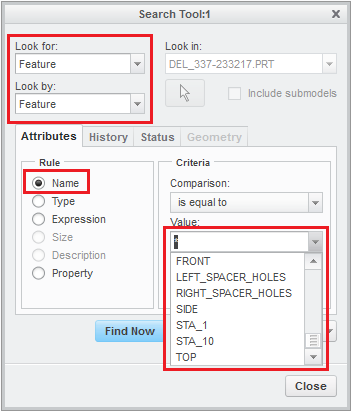
You should be able to use the find tool to locate both dimensions and features by their names.

1 reply

14-Alexandrite
May 13, 2016

Hi,

You can rename the dimensions/features used in the family table to the desired names (e.g. cutter_dia from d2)

fam_tab2.JPG

fam_tab1.JPG

& the column name will show both dimension id & name

fam_tab3.JPG

hope this helps

Pushkar

mkrawczyk1-VisitorAuthor
1-Visitor
May 14, 2016

Well, I know about this opportunity, however, the problem is a bit different. Unfortunatelly, I cannot find any feature/dimension/or what ever which has the same name as at the top of the column in Family table. The only place I have found this name is probably in the desciption of one of defined parameters. I didn't prepare this model from the beginning and due to this it is quite problematic to find it. Maybe there is some other possibility to rename the column located in Family table?

1-Visitor
May 16, 2016

Please add screen shot for better understanding of your question.