1-Visitor
October 29, 2014
Solved

FLATTEN SWEEP?

  • October 29, 2014
  • 10 replies
  • 6219 views

Does anyone know a good way to flatten a sweep of a round bar.


This thread is inactive and closed by the PTC Community Management Team. If you would like to provide a reply and re-open this thread, please notify the moderator and reference the thread. You may also use "Start a topic" button to ask a new question. Please be sure to include what version of the PTC product you are using so another community member knowledgeable about your version may be able to assist.
Best answer by ptc-814643

This is all probaly overkill for your question, but here is some information anyway.

Image2.jpg

With FASTBLANK for Creo, we expect the pipe to have a 0.100" slit in it to allow the software to "open-up" the pipe. If you can add this to your Creo model I'll develop the blank for you. I'll need to know your material properties to be accurate.

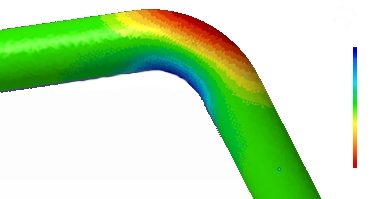
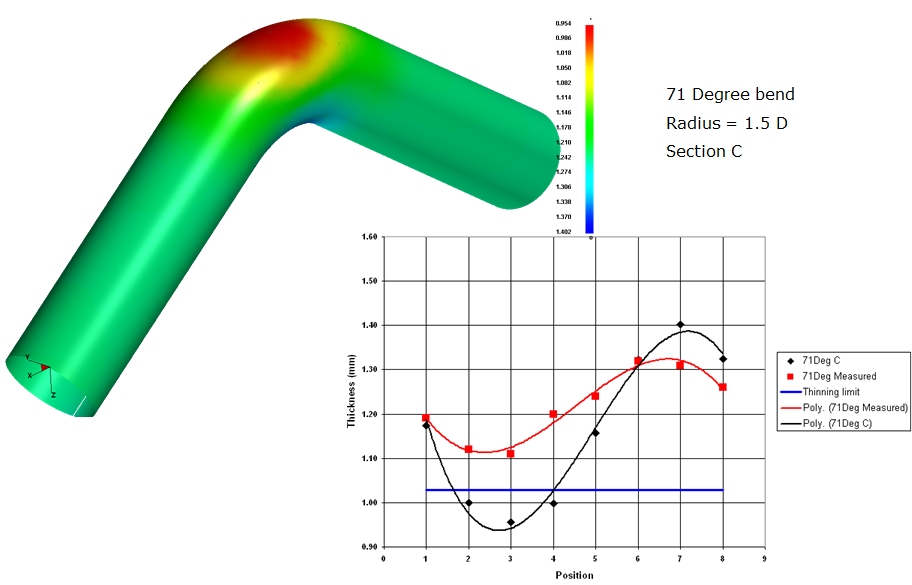
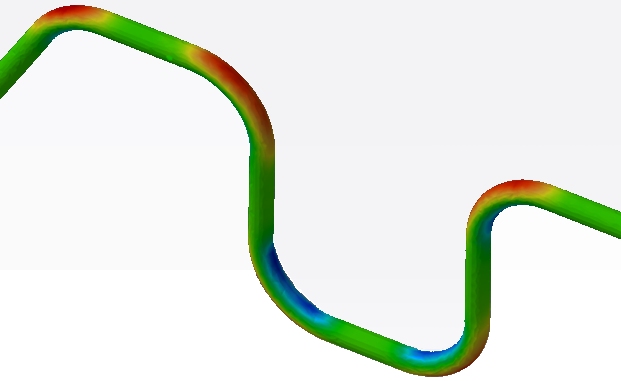
Additionally, FormingSuite is able to conduct a formability study on tube bending.

Image1.jpg

Image3.jpg

10 replies

1-Visitor
October 29, 2014

Guessing that you're looking for a developed length/flat pattern?

I've had good results with an unnamed, superior cad system by modeling the component as sheet metal (not a sweep) whose thickness and width is the diameter of the bar. This will get you the flat length. For appearances sake, apply a full round and there it is.

There is probably an easier way to do this but it has worked well for me.

I also tweak the k factor to more like .5, but shop practice will dictate the final value.

1-Visitor
October 29, 2014

thats what I currently do, I was wondering if there was an easier way or a recommended way from PTC.

1-Visitor
October 29, 2014

FASTBLANK for Creo is a Finite Element Based program from Forming Technologies www.forming.com to create flat patterns (aka Blank Shapes) from complex geometry. It is primarily intended for sheet metal parts but with an extended material database any geometry can be flattend.

The FASTBLANK for Creo solver takes into account the material properties and accounts for stretch and deformation.

17-Peridot
October 29, 2014

What exactly are you trying to achieve? it is easy to use a square stock in sheetmetal to represent the tube in order to get a flat length. You can adjust the K or Y factor to your process. If all you need is a number, you can use a perimeter value in a "spine" sketch or use a length analysis feature to capture the data. It all depends on what your end goal is.

1-Visitor
October 29, 2014

I am just looking for an easy way to get a flat pattern, and overall length. The way Jim Moser suggested is what we are currently doing, and is quite easy, but I was wondering what some other ways might be.

17-Peridot
October 29, 2014

There is no need to do the sheetmetal approach. Often times I need to know my developed length to cut clearances. I do this in my sketch, in your case, reference the sweep sketch. Unless you want the center axis to be the developed length, you can create a sketch with an offset from the sweep origin. The offset would represent the K or Y-Factor you wish to use.. Use an analysis feature on the sketched curves to obtain your developed length.

1-Visitor
October 30, 2014

This is all probaly overkill for your question, but here is some information anyway.

Image2.jpg

With FASTBLANK for Creo, we expect the pipe to have a 0.100" slit in it to allow the software to "open-up" the pipe. If you can add this to your Creo model I'll develop the blank for you. I'll need to know your material properties to be accurate.

Additionally, FormingSuite is able to conduct a formability study on tube bending.

Image1.jpg

Image3.jpg