

1-Visitor
October 9, 2015
Solved

Flexible reference handling in Top Down Design approach

  • October 9, 2015
  • 13 replies
  • 6545 views

Hello guys

I wonder how do you handle references between skeleton model and related parts to ensure the most flexibility as possible?

What I understand as "flexibility"?

* to me it is approach which ensures to you freely change of any entity in existing sketchers or even deleting them or even entire features without influencing final Publish Goemtry featutes which contains them

I start prototyping the product in Creo as soon as possible, making as much attempts and trial and errors I can.

This results often in critical changes, making whole idea of product, upside down, when simultanuesly appropriate Creo assembly is heavly advanced.

In such moment making significant changes is the first step to hell.

I hope I made my problem clear. So how dou manage references to let you change skeleton features without invoking every often solving problem of Public Geometry?

I found Datum Reference feature as some nice solution however it only helps to avoid regeneration problem of Public Geoemtry feature when single entities or quilts are removed not the whole features which represent them.
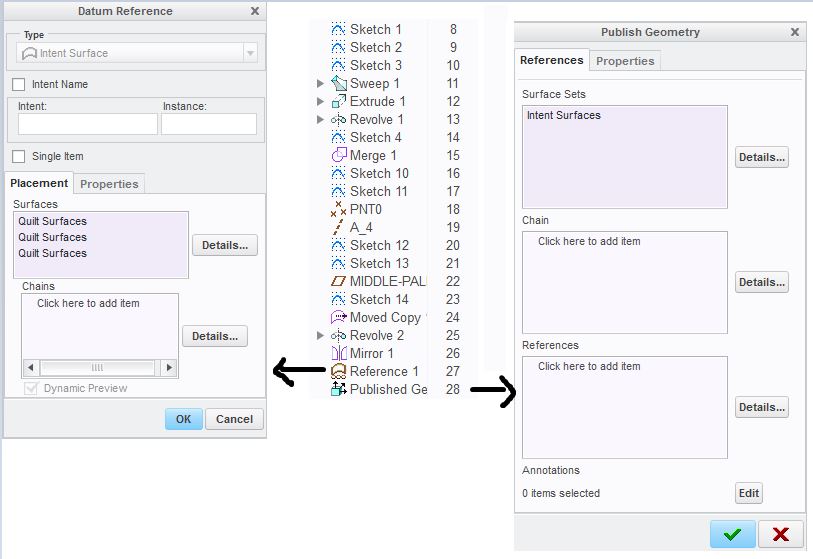
basic skeleton 2.JPG

Best answer by vzak

Hi Jasek,

Let me re phrase your goal :

- adding ALL entities of certain type to PubGeom (put it to Footer, use Move to Footer command),

- easy way to ensure all new created entities get there as well\

- ensure that when some is Deleted - your PG does nto fail (and your Copygeom does not either).

OK, here you go : use QUERIES in PubGeom collectors. e.g. :

1. To copy all surfaces : when Surfaces collector active, go Ctrl-F, set Surfaces / All / Add Query / Options / Save Query to FEATURE !

2. To copy all 3D Curves : when Chains collector active, go Ctrl-F, set 3D Curves/ All / Add Query / Options / Save Query to FEATURE . Same for Edges etc.

3. For Datums - go to References collector, do the needful.

"OK" the feature.

Now :

1. When you Delete one of collected reference - PG will not fail since reference is a kind of collection.

2. When collected references move : PG reflects it immediately.

3. When you ADD new surfaces or curves etc and want PG to get them : RMB on PubGeom, Update Query. You can make a simple mapkey for "select ALL PG features in ALL models / Update Query".

Here you go, this capability was made especially for your defined purposes. Please let me know results.

- Vlad

13 replies

21-Topaz II
October 9, 2015

Perhaps I am hearing you wrong, but it sounds like for you flexibility means being able to change without feature failures.  I'll push back on you and say that the flexibility you want is not to have feature failures due to technique. Feature failures because of a design problem are good, they tell you that you cannot acheive what you now want given how the model was built.

I've done a lot of skeleton driven TDD over the last decade.  In fact, I rarely build an assy without it anymore.  There are a lot of things to address, but I'll touch on a few.

The biggest thing you can do it build your design spec into your features.  As someone rolls through your model tree, they should be able to create a design spec for your model based on how you built it.  As you create a feature, make every reference meaningful.  This hole needs to be tied to that surface so they move together, this cut needs to maintain it's relationship to that boss, so dimension it there.  Make every reference count.

Don't be afraid to redefine features to better reflect your design intent as it changes.  I've gone into feature 5 or 6 of a skeleton that drives dozens of parts and thousands of features when the design spec changed and that was where it was defined.  If you've done a good job on the first point you can do this with minimal failures down stream.

Reroute and replace is your friend.  Rather than deleting references in the sketch or in the feature, use the replace function in sketcher and the reroute for features to maintain the references for the children.  Replace entities in sketcher is particularly powerful as it means the new entity carries the same ID as the old one and any surfaces or edges created by it carry the same IDs as well.  Downstream features then won't fail, unless there are geometry conditions that cause failure.

Don't be afraid to go all in.  There's a temptation to make your skeleton basic and only put in "critical" features.  I've found that I have better luck when I put in pretty much everything that 2 or more components share, particularly early in the process.  Near the end, the value of the skeleton is less and I'll skip adding very minor things to it the closer we get to tooling, but early on it pretty much all goes in.

in general, I've found the more that you build carefully and intentionally to reflect your design intent, the more robust and flexible your models become.  I've also found that maybe less than 25% of users really get this and use it to its full potential.

1-Visitor
October 12, 2015

Hello Doug

thank you for your comment.

I follow same steps you discribed above. There is nothing I can add to this or extend.

All you wrote is true, however this is not what I was asking about.

The issue I tried to describe in my first post, was about having TDD assembly with some extra flexibility regarding handling the references.

My goal would be:

* making Publish Geometry feature more inteligent, this means it should collect the entities itself without manualy placing every new curve or quilt by the user

* making the publish geometry less sensitive to changes of entities it contains.

I am aware this appraoch won`t find a place or be reasonable for big, matured assemblies like valves, engines, and so forth, where product exists long on the marker and it is necessary to create some kind new variant of it. However for smaller products or subassemblies where content or shape is not known or under development I found such possibility very intresting to have.

21-Topaz II
October 12, 2015

Ah, I see, sorry to go off track.

I find that using intent chains or intent surfaces when available are helpful here, but they are not always available in the configuration that you need,  I guess I just deal with the failures & changes as they come.  The reroute & replace I mentioned can help minimize downstream failures too.

I'm not familiar with the reference feature you've illustrated above, is that a bit like building your own intent groups?  I remember seeing something on that a while back, but never was able to use it.  Can you elaborate on how you've made that?

14-Alexandrite
December 6, 2015

I'm a bit late to the party here, but thought I'd chime in as I use a totally different approach to this problem.

I eschew using Copy Geom features entirely.  Too many steps to go from a sketch in a skeleton to a solid feature in a part, and too many ways it can break when you update the sketch.  Instead, I just use the features in the skeleton part directly without ever copying them.

This does require a change to typical model hierarchies at times.  For instance, if I am creating even a simple part that I want related to the top level skeleton...  I wrap it in an assembly.  Everything that needs reference links gets an assembly.  A duplicate instance of the top level skeleton (or several skeletons) is placed in this assembly.  The part within is named identically to the assembly, or with a suffix to indicate it's subordinate.  The part is activated, and then you start making solids.  You can select sketches & datums from the skeleton, without ever having to copy them. Saves a bunch of steps, and eliminates copy geom features that can break when making changes.  You just have to get used to having these extra assembly wrappers around various simple parts.  (For more complicated parts, you'd probably need an assembly wrapper anyway, for instance to add threaded inserts, etc.)

TOP_ASSY.asm

            TOP_SKELETON.prt

            COMPONENT_1.asm

TOP_SKELETON.prt

COPONENT_1.prt

            COMPONENT_2.asm

TOP_SKELETON.prt

COPONENT_2.prt

12-Amethyst
December 7, 2015

I don't follow why COMPONENT_1.asm and COMPONENT_2.asm exist at all.

I get that you're activating COMPONENT_1.prt and referencing the skeleton features. I've been there. But why bother with the COMPONENT.asm? Couldn't you more easily...

TOP_ASSY.asm

            TOP_SKELETON.prt

            COMPONENT_1.prt

            COMPONENT_2.prt

... then activate the COMPONENT.prt and get your external references from the TOP_SKELETON.prt that way?

23-Emerald IV
December 7, 2015

Just guessing here...but probably so he can work on the individual components without needing to have the top level assembly open.