1-Visitor
March 4, 2025
Question

Framework AFX - Creating a new profile (Creo Parametric 9.0.2.0)

  • March 4, 2025
  • 4 replies
  • 2572 views

I have been trying to follow some previous discussions on creating a tube profile, but haven't had any luck:


https://community.ptc.com/t5/3D-Part-Assembly-Design/Creo-4-0-Framework-custom-tube-profiles/m-p/675536


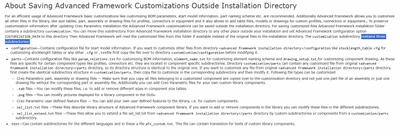
https://support.ptc.com/help/creo/creo_pma/r7.0/usascii/#page/advanced_framework/About_Saving_Advanced_Framework_Customizations_Outside_Installation_Directory.html#


Following the instructions, I have copied the customization folder to a network drive, however I noticed that the customization folder did not contain the three sub directories (*see attached) as mentioned in the instructions--they were separate.  I tried dropping them into the Custom folder on my local copy.
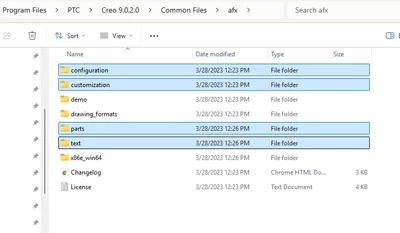
CS_12994163_1-1741113806529.png

CS_12994163_2-1741113888849.png

After making a copy I tried two things: 

1.)making a new folder directory and then copying and editing an existing profile

2.) adding a size to an existing profile


neither has worked.
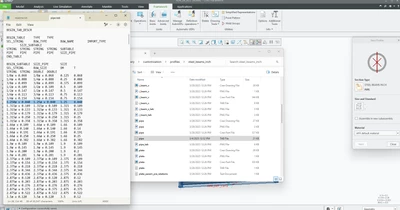
CS_12994163_0-1741113713974.png


I have mapped the customization folder in the afx options with no luck.  I have also tried mapping the library path as well with no luck.


I have mostly copied and pasted the table text, but made sure to separate the table values with tabs.  I am using notepad.  I have also tried updating the sel_list with no luck.
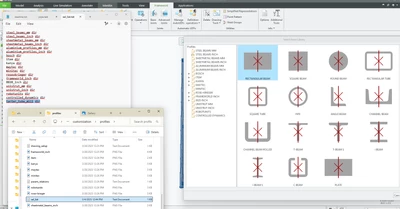
CS_12994163_3-1741114720856.png


What am I missing?  


Thanks for your help!


4 replies

6-Contributor
March 4, 2025

I have also been working on customizing AFX libraries at my work with Lots of Struggles.


I haven't been able to get the actual customization folder/directory to work, but I was able to Copy the ENTIRE afx directory from the Install location to my documents, route my path thru their configuration options (within AFX tab) to the copied profiles folder i wanted to manipulate, I am adding my custom parts directly to the sel_list.txt, I copied the Profiles folder (in my case it was 80/20), renamed it to what I needed it to be, and manipulated/renamed the copied as i needed them.  In my case it was t-slot profiles

MSPAINTCOMEBACK_0-1741125316407.png

MSPAINTCOMEBACK_1-1741125371644.png

MSPAINTCOMEBACK_2-1741125408026.png

MSPAINTCOMEBACK_3-1741125520553.png


I was able to get profiles working by using modified copies of the current existing library parts, but right now my struggle is with assembling bolt kits and hardware with the hardware library we want to use, which I am trying to customize.


16-Pearl
March 5, 2025

Hi @CS_12994163 ,


please first of all watch this video at the timestamp. This covers how the customization works. 


https://youtu.be/-iLYU-YT8e4?si=SjX0-1FHeSdClogc&t=431


I hope this helps.

6-Contributor
March 6, 2025
The link was very helpful, thank you.
Still having some struggles with custom hardware but this is a good start so I'm not ruining the Base Default directories in my local copies.

Community Manager
March 18, 2025

Hi @CS_12994163,


I wanted to see if you got the help you needed.

If so, please mark the appropriate reply as the Accepted Solution. It will help other members who may have the same question.
Of course, if you have more to share on your issue, please pursue the conversation. 


Thanks,
Anurag

13-Aquamarine
May 30, 2025

I am eagerly awaiting an automated tool to do this. I really stuffed my system attempting these file and folder edits and relocations. I ended up deleting creo and reinstalling and just leaving the profile directory alone. Sadly, manually creating these extrusions seems a waste of creo horsepower. In the meantime, maybe there is a simple workaround such as importing a manufacturers profile tables using a tool that puts the files in the right directory/folder so they populate in AFX correctly.