

17-Peridot
May 13, 2014
Solved

Geometric tolerances option

  • May 13, 2014
  • 2 replies
  • 1454 views

Hi all,

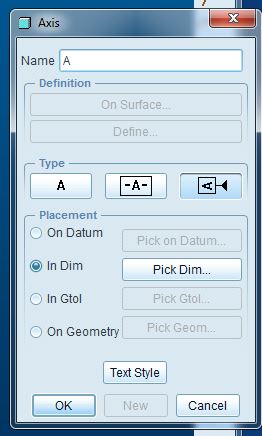
  1. when I have to declare the datum references, I have to choice between two options, but I don't understand the real differences betwenn these ones.
    Cattura.JPG
  2. In second instance, is there a way to put the reference on a surface without creating a plane and putting the reference on the plane (that it is on the surface...) ?

Bye


This thread is inactive and closed by the PTC Community Management Team. If you would like to provide a reply and re-open this thread, please notify the moderator and reference the thread. You may also use "Start a topic" button to ask a new question. Please be sure to include what version of the PTC product you are using so another community member knowledgeable about your version may be able to assist.
Best answer by TomD.inPDX

The middle version of the tag is the older ASME Y14.5 version (ANSI Y14.5). The newer one on the right is an ISO allowance that has become the staple in most drawing standards today.

You can re-assign datum tags to surfaces. However, there will still be a datum feature such as a plane or axis as the identifying reference.

I will say this; do not use any of the primary datum planes to assign datum tags. Use a surface to define the datum "intent" surface and let the system make the plane to create the tag. It is all very convoluted, but again, the tag belongs to either a datum plane or a datum axis. Re-assigning it later to a surface or a dimension can be done but the plane and axis will remain.

2 replies

17-Peridot
May 14, 2014

The middle version of the tag is the older ASME Y14.5 version (ANSI Y14.5). The newer one on the right is an ISO allowance that has become the staple in most drawing standards today.

You can re-assign datum tags to surfaces. However, there will still be a datum feature such as a plane or axis as the identifying reference.

I will say this; do not use any of the primary datum planes to assign datum tags. Use a surface to define the datum "intent" surface and let the system make the plane to create the tag. It is all very convoluted, but again, the tag belongs to either a datum plane or a datum axis. Re-assigning it later to a surface or a dimension can be done but the plane and axis will remain.

15-Moonstone
July 2, 2015

This dialog box has nothing to do with how the datum flags look.  It's a poor interface choice on PTC's part that I've documented here: Change Datum Tag Symbology to reduce confusion