1-Visitor
January 9, 2015
Solved

Hide Parts in Assembly

  • January 9, 2015
  • 5 replies
  • 5649 views

Creo Elements/Direct Modeling 18.1

Opening a PKG assembly. Now select part, right-click, but no "hide" or "locate in model tree" command available. Is there a shortcut to hide a selected part?


This thread is inactive and closed by the PTC Community Management Team. If you would like to provide a reply and re-open this thread, please notify the moderator and reference the thread. You may also use "Start a topic" button to ask a new question. Please be sure to include what version of the PTC product you are using so another community member knowledgeable about your version may be able to assist.
Best answer by GaryLinscheid

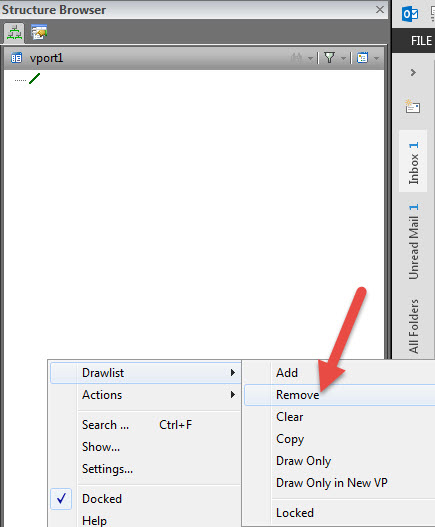
Right click in the Structure Browser and select Drawlist, Remove and then select the model in the view port.

2.jpg

You can also hide anything by unchecking the box in front of the item in the Strucutre Browser.

You can add the remove from drawlist command to a toolbar.

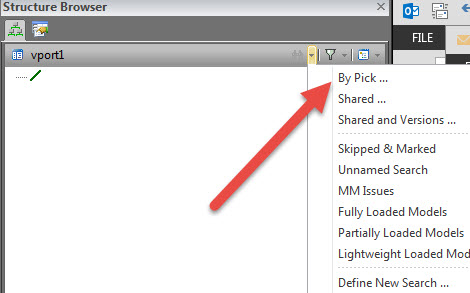
To find something in the browser you can use By Pick... and select the model and it will be highlighted in the Browser.

1.jpg

5 replies

15-Moonstone
January 9, 2015

Right click in the Structure Browser and select Drawlist, Remove and then select the model in the view port.

2.jpg

You can also hide anything by unchecking the box in front of the item in the Strucutre Browser.

You can add the remove from drawlist command to a toolbar.

To find something in the browser you can use By Pick... and select the model and it will be highlighted in the Browser.

1.jpg

1-Visitor
January 9, 2015

Thank you very much!

1-Visitor
January 9, 2015

I added a Drawlist Tab to the Ribbon to help with this situation.

Mike

Drawlist.png

1-Visitor
January 15, 2015

I think PTC should add these command by default to the Utilities group in the ribbon. i do the same as you do

17-Peridot
January 15, 2015

For me, the most being used keys are best kept in the command mini toolbars.

Then you do not have to move the mouse to the the Ribbon.

That really saves time

Scrennshot.jpg