

1-Visitor
January 22, 2017
Solved

How can I change how dimension lines appear?

  • January 22, 2017
  • 2 replies
  • 2930 views

Hi,

So I have this problem with how the dimension lines appear. With small dimensions when the arrows are outside of the witness lines there is no line to connect the witness lines. This becomes quite messy  when having a lot of small dimensions. I would like to change the dimension style so that the witness lines are always connected.

Does anyone know how to change this? I'm using creo 2.0.

Thanks.
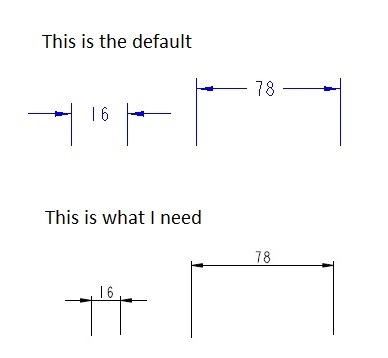
dimension style.jpg

Best answer by StephenW

There is a drawing setup option under FILE PREPARE DRAWING PROPERTIES detail options CHANGE

default_lindim_text_orientation

use the value parallel_to_and_above_leader

2 replies

StephenW23-Emerald IIIAnswer
23-Emerald III
January 23, 2017

There is a drawing setup option under FILE PREPARE DRAWING PROPERTIES detail options CHANGE

default_lindim_text_orientation

use the value parallel_to_and_above_leader

12-Amethyst
January 23, 2017

Noting that you appear to have ASME-style dimension cosmetics, and are interested in ISO/JIS/DIN style, you may also wish to look at the various options that differ between the default prodetail.dtl (ASME) and iso.dtl / din.dtl / etc.  Having figured the set of values that work for the standard you want, use this detail setup as your default (in your drawing template and/or the config 'drawing_setup_file'.

kboo1-VisitorAuthor
1-Visitor
January 25, 2017

Solved, thanks for replies.