

10-Marble
March 15, 2017
Solved

How can I find irrational dimensions? e.g. 1.242354363

  • March 15, 2017
  • 2 replies
  • 1292 views

I've recently received several Creo models and drawings. In a few drawings I've noticed that while some dimensions are displayed as 5.00 they are actually 5.001325334....


Is there anyway I can quickly find such dimensions without having to manually interrogate each one? I can then fix these dimensions in the model.
Best answer by mbonka

Hello rhudd

try following in drawing space.

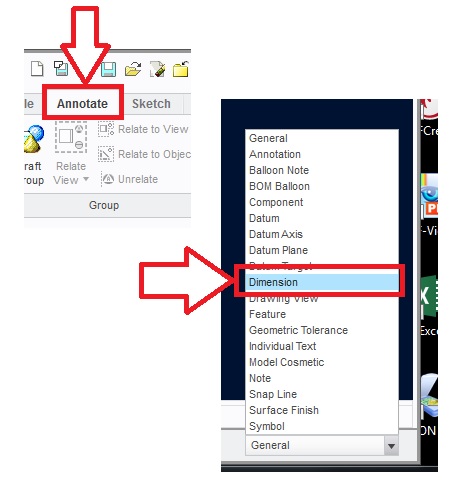
1. Active Annotate bar - set filter to dimmension (right bottom corner)

01-set_filter.jpg

2.  Select all dimmensions in your drawing (with mouse)

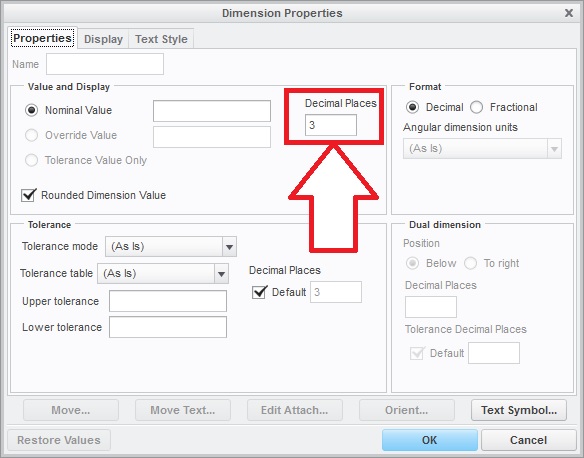
3. Press RMB - select properties - set decimal places to 30

02-decimal_places.jpg

4. Find "bad" dimmensions


Hope it can help

Regards

Milan Bonka

2 replies

mbonka2-ExplorerAnswer
2-Explorer
March 15, 2017

Hello rhudd

try following in drawing space.

1. Active Annotate bar - set filter to dimmension (right bottom corner)

01-set_filter.jpg

2.  Select all dimmensions in your drawing (with mouse)

3. Press RMB - select properties - set decimal places to 30

02-decimal_places.jpg

4. Find "bad" dimmensions


Hope it can help

Regards

Milan Bonka

rhudd10-MarbleAuthor
10-Marble
March 15, 2017

Thanks for the suggestion, this is a nice approach that works well.