

1-Visitor
May 24, 2017
Solved

How can you search for rounded dimensions in a drawing?

  • May 24, 2017
  • 2 replies
  • 1507 views

The problem is this:

rounded dimensions are causing problems

no known way to search for which dimensions are rounded and which are not except by opening ever dimensions properties

all new drawings have config setup to have rounded dimension value deselected but checking drawings that have had changes made by others without this config activated brings up the issue.

Possible solution to the problem:

finding a way to search dimension that have been rounded.
Best answer by StephenW

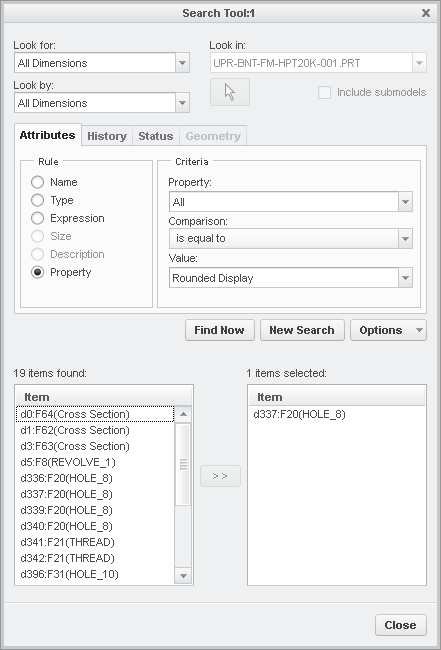
In creo 3 (not sure about other releases), go to the find tool, look for: all dimensions, look by: all dimensions, set attributes to property, one of the values is "rounded display"

2 replies

StephenW
StephenW23-Emerald IIIAnswer
23-Emerald III
May 24, 2017

In creo 3 (not sure about other releases), go to the find tool, look for: all dimensions, look by: all dimensions, set attributes to property, one of the values is "rounded display"

cwarnock1-VisitorAuthor
1-Visitor
May 24, 2017

Exactly what I was looking for. thanks a ton!