1-Visitor
September 2, 2015
Solved

How do I attach a symbol (Surface finish) to a sketch in Creo? Did it all the time in ProE, but it doesn't want to attach in Creo.

  • September 2, 2015
  • 1 reply
  • 3061 views

Our normal way of indicating that a surface finish applies to a region, is to draw a sketch indicating the region, and then attach the surface finish symbol to it, and not to the part geometry. This worked just fine in ProE, but I've just started using Creo 3, and the finish symbol won't attach to the sketch! Which means I can make the drawing look good, but as soon as a view moves, the symbol will be in the wrong place.

Best answer by MartinHanak

Brett,

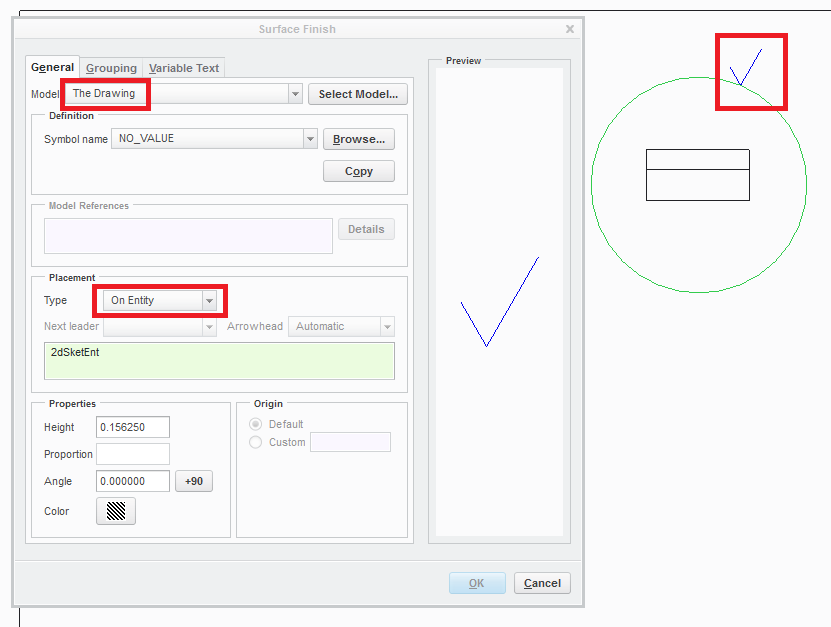
see the attached picture ...

surface_finish_on_circle.png

Martin Hanak

1 reply

24-Ruby III
September 2, 2015

Brett,

see the attached picture ...

surface_finish_on_circle.png

Martin Hanak

bbellmore1-VisitorAuthor
1-Visitor
September 2, 2015

Testing that out, I find that I can attach to sketches in the drawing when set to the drawing, (Which is good.) but still can't attach to the line in the model when set to the model.

However, it appears we can use our custom surface finish symbol through the symbols menu, and it will attach in both ways. Strange, but I can work with it.

Thanks!