

1-Visitor
September 13, 2015
Solved

How do I extrude a hole on this surface at such an angle?

  • September 13, 2015
  • 2 replies
  • 4901 views

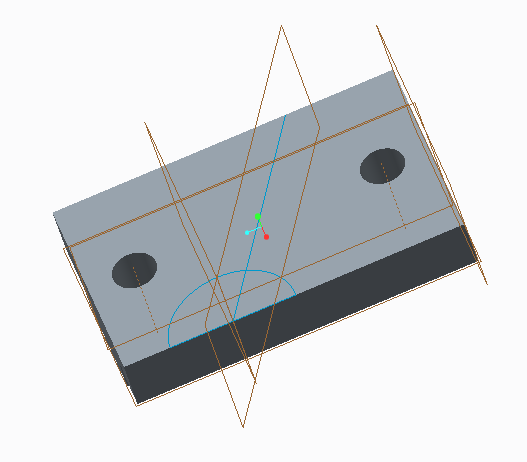
I'm working on this Angle Bearing for a class (really simple part so it shouldn't be taking me this long) and the one thing I'm stuck on is the hole that is extruded across the top surface of the part. I've never really worked much with angled extrusions in Creo - Creo 2.0 Parametric - and so this is kinda tricky for me. I've got a basic sketch of the larger hole and the path I want it to follow, but I'm lost as to how I can actually make it an extrusion across that surface. I want it to start on the edge it's sketched on (obviously) and then stop on the other side of the part.

Any help is appreciated!

Thanks!Hole Extrusion.PNG
Best answer by jhorst

The way my friend went about it was using the Sweep feature like MartinHanak mentioned in his reply, but my friend said to draw the trajectory line on the top surface, click Sweep and then sketch a circle on the end I show, make it go past both edges of the part and then finally make to datums on each end surface and click Solidify to cut the extrude off at each surface designated.

2 replies

24-Ruby III
September 13, 2015

James,

you can use Sweep feature.

Also attach your model (if you can), see How to upload Creo (or other) files

Martin Hanak

jhorst1-VisitorAuthor
1-Visitor
September 13, 2015

It's all good - I got a friend of mine to help me out and explain it a little more, but thanks!

Mahesh_Sharma
22-Sapphire I
September 14, 2015

James,

You can share the information which help you and mark that as correct answer.

13-Aquamarine
September 22, 2015

An alternative solution would be to revolve the hole, sketching on the angled plane you show in your screenshot.