

1-Visitor
November 26, 2014
Solved

How to arrange positions in BOM?

  • November 26, 2014
  • 3 replies
  • 8356 views

Hello,

I would need to arrange parts in bill of material so that they are in the same order as in the model tree.

i guess it is made by "sort regions" option but i have never used it...

The BOM now looks like folowing:
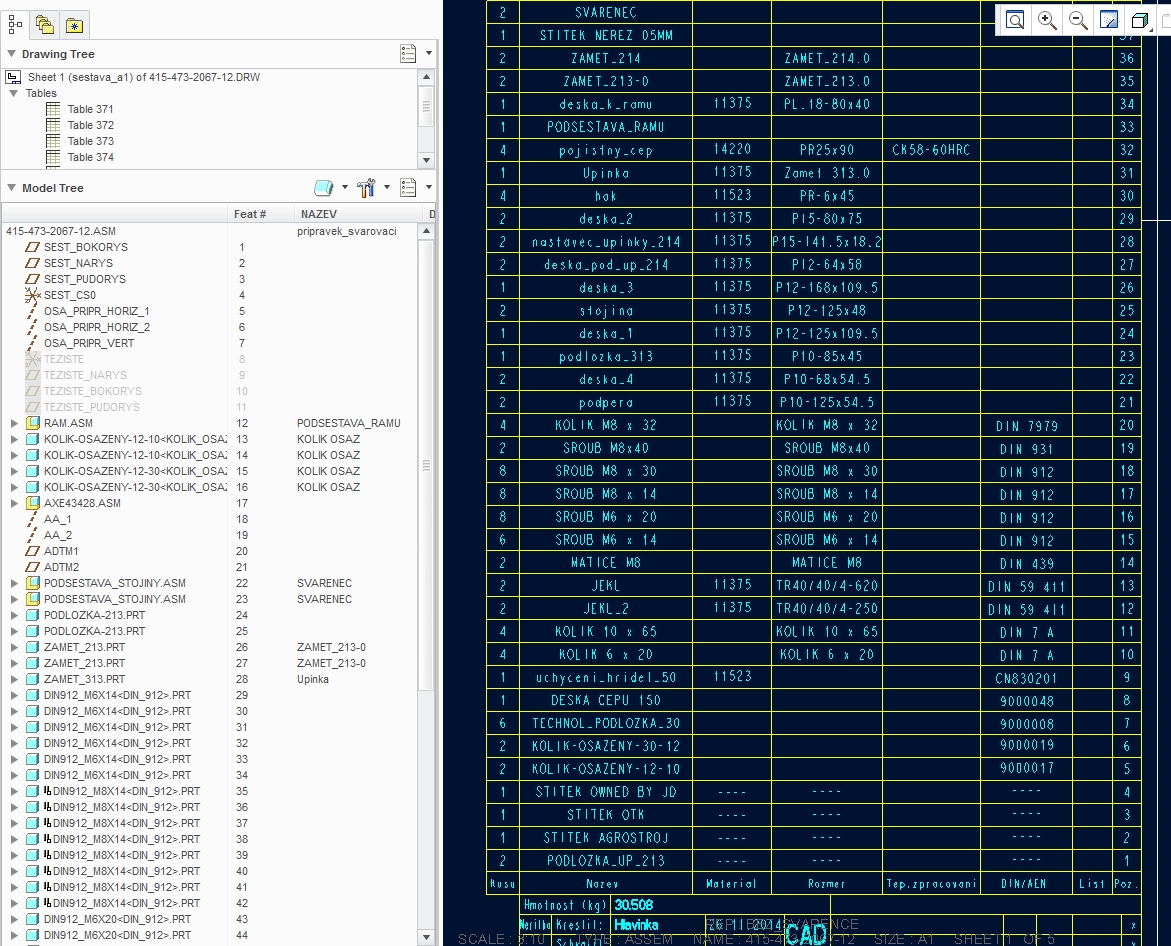
1.jpg

Thanks in advance


This thread is inactive and closed by the PTC Community Management Team. If you would like to provide a reply and re-open this thread, please notify the moderator and reference the thread. You may also use "Start a topic" button to ask a new question. Please be sure to include what version of the PTC product you are using so another community member knowledgeable about your version may be able to assist.
Best answer by huggre

Hi

Try this:

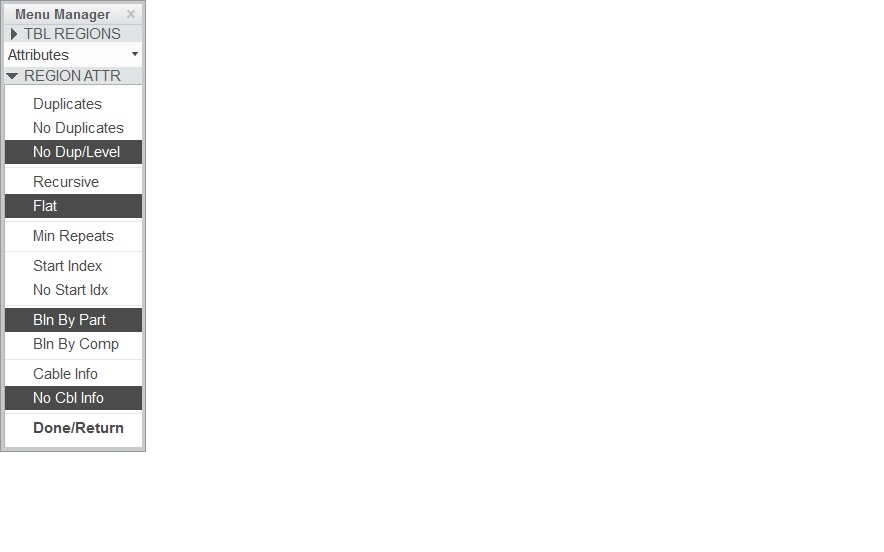
Select Repeat Region->Attributes, select the table and then set the region attributes as follows. region.jpg

3 replies

huggre1-VisitorAnswer
1-Visitor
November 26, 2014

Hi

Try this:

Select Repeat Region->Attributes, select the table and then set the region attributes as follows. region.jpg

thlavinka1-VisitorAuthor
1-Visitor
November 26, 2014

Thanks for your quick reply.

As i noticed the command "recursive" shows all parts (including subassemblies) in the BOM - thats exactly what i need.

thlavinka1-VisitorAuthor
1-Visitor
November 27, 2014

Since my employer has a bit specific needs in terms of bill of material, i would need to show all parts of subassembies in BOM. It means if there are for example two subassemblies that are the same - in the BOM there should be 2subassemblies (it is ok) but each part of the subassembly should be shown 2times too. In the repeat region below it is wrong:

1.jpg 2.jpg

Is there some way to manage it?

thanks in advance

1-Visitor
November 27, 2014

Hi Tomas,

The solution is basically to choose No Duplicates in Repeat Region Attributes, which is gonna mess up with the order of all your parts/assemblies, and then use Sort Regions to get the Repeat Region behave the way you want.

Sort Region requires a user-defined parameter on model level, such as SORT. If some of the parts/assemblies haven't got this SORT type parameter then it is possible to tell the specific Repeat Region to give these models this specific SORT parameter via Repeat Region Relations.

Standard/Library parts usually don't have this SORT kind of parameter.

Basics about Sort Region are mentioned here.

http://communities.ptc.com/message/227294#227294

http://communities.ptc.com/message/176078#176078

thlavinka1-VisitorAuthor
1-Visitor
November 28, 2014

Hi Jakub

is there some way to add a relation to the rep.reg. to multiple some parts of the subassembly (showed on the pic) by 2 since there are 2 subassemblies in the drawing and your company uses it that way?

On the pic i added one more column where i wrote all quantities according our needs.

thanks in advance

T.

2-Explorer
November 28, 2014

Hello all,

don´t understand what you exactly need. But NESTED REPEAT REGION can be a solution of your problem. Please see Creo help center or PTC forum for more information.

How does it work?

It will create a table that shows model tree structure.

For me it´s not easy describe how to create a nested repeat region. But in generall it´s a repeat region inside other repeat region. How many times you will put a repeat region into other one = so many sublevel assemblies you can show in table. (Czech translate: Repeat region vnořte do druhého repeat regionu. Toto můžete opakovat a podle počtu opakování vnoření se určí kolik úrovní podsestav budete v tabulce zobrazovat.)

This way l created a tables for different subaseblies levels.

Asembly structure lvl0 - it is a simply repeat region

Asembly structure lvl1 - shows 1 level of subasemblies

Asembly structure lvl2 - shows 2 level of subasemblies

Asembly structure lvl3 - ........

Usually l have 4 levels of subasemblies in my projects.

See attached files. There is an example of lvl2 table. It needs to be configure for your parameters.

Note:

Presents of slim colums with stars "*" is from the reason of easy import table into Excel. During import a TXT file to Excel you will choose "divide colmuns with user mark" and the mark will be star "*".

nested_repeat_region.jpg

1-Visitor
November 29, 2014

Nice Milan,

I've totally forgot about nested repeat region, for me this was no solution.

Hopefully it will do the job for Tomas. Just because of quantities, messing with Repeat Region Relations is not a good idea.

I still stand behind that repeat region is just a dummy, and combining them, or using them to drive anything else isn't really a good idea.

Nesting is fine, but once you get to the point you need to use parameters such as &rpt.rel.userdefined which require Repeat Region Relations, then things get rather cumbersome.