1-Visitor
March 9, 2015
Solved

How to check family table Instance & generic using modelcheck ?

  • March 9, 2015
  • 1 reply
  • 3824 views

How to check family table Instance & generic using modelcheck ?


This thread is inactive and closed by the PTC Community Management Team. If you would like to provide a reply and re-open this thread, please notify the moderator and reference the thread. You may also use "Start a topic" button to ask a new question. Please be sure to include what version of the PTC product you are using so another community member knowledgeable about your version may be able to assist.
Best answer by Mahesh_Sharma

Yes, you can use ModelCHECK to add parameter in family table instances (Not sure about interaction with Windchill).

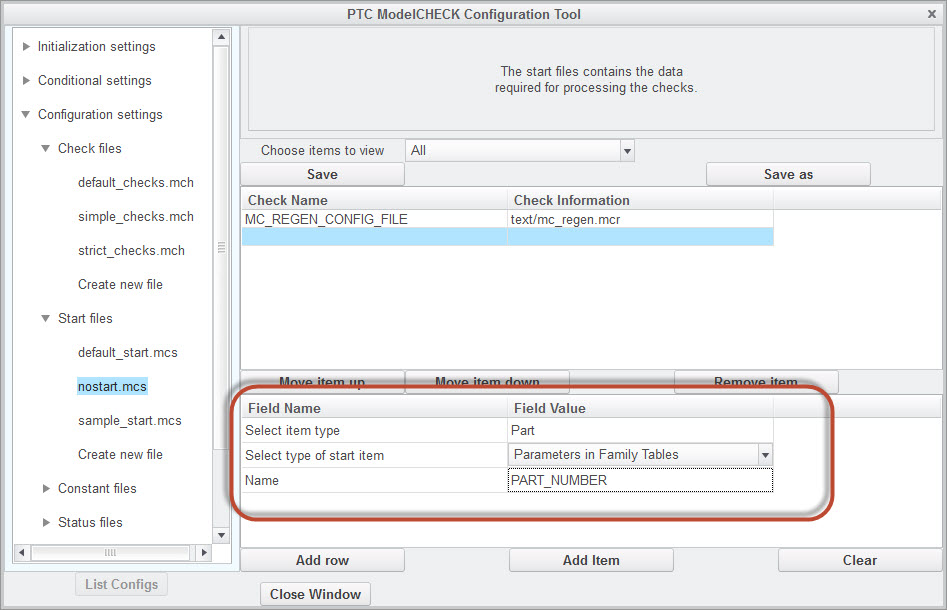
1. Set Check parameter FT_STD_PARMS as E in check file.

2. Add ModelCHECK parameter [MODE]_FT_PARAMETER [Parameter_Name] in start file (e.g. PRT_FT_PARAMETER PART_NUMBER)

FT1.jpg

-------------------------------------------------------------------------------------------------------------------------

Results in my test case was as:

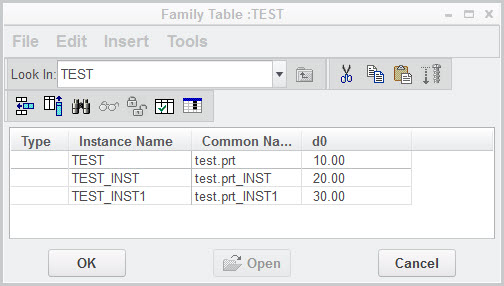
Generic part is test.prt (with parameter part_number) and family table was as:

FT2.jpg

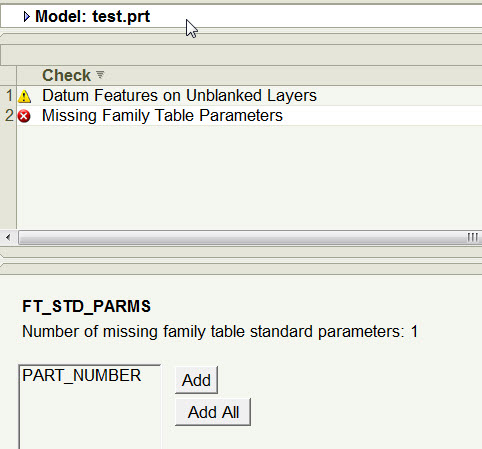
After executing ModelCHECK, results were reporting error and added all parameters.

FT3.jpg

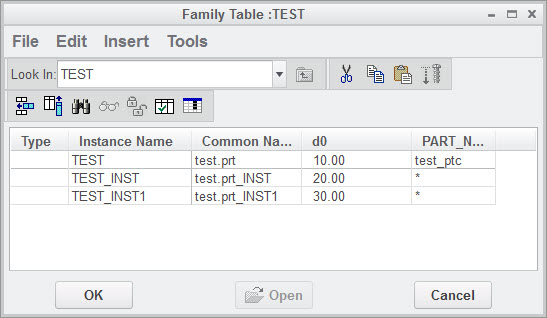
End result was as:

FT4.jpg

1 reply

Mahesh_Sharma
22-Sapphire I
March 9, 2015

Haris,

Could you explain this in detail?

1-Visitor
March 10, 2015

Hi

In family table , the instance name is different to generic & instance .

But ,the parameter part_number remains same for Generic & instance because the instance will derive the value of part_number ( tools - parameter) from generic.

It is showing conflict when we are uploading into windchill because the part_number same for two different object (Generic & Instance) .

We found the solution for above issue by adding part_number as a parameter column inside family table dialogue box & remove the value of Instance (blank) & keep generic value .

Have more than 200 family table parts like this & its difficult to open all the family table parts and adding part_number column .


what I am expecting is when I am running Model check from generic,It should show part_number column is not present in family table dialogue box whether to be added or not if it is added what is the value for generic & Instance .


It would be better , if there is any solution in model check ?

Mahesh_Sharma
22-Sapphire I
March 11, 2015

Yes, you can use ModelCHECK to add parameter in family table instances (Not sure about interaction with Windchill).

1. Set Check parameter FT_STD_PARMS as E in check file.

2. Add ModelCHECK parameter [MODE]_FT_PARAMETER [Parameter_Name] in start file (e.g. PRT_FT_PARAMETER PART_NUMBER)

FT1.jpg

-------------------------------------------------------------------------------------------------------------------------

Results in my test case was as:

Generic part is test.prt (with parameter part_number) and family table was as:

FT2.jpg

After executing ModelCHECK, results were reporting error and added all parameters.

FT3.jpg

End result was as:

FT4.jpg