
1-Visitor
August 2, 2017
Solved

HOW TO CONTROL THE LENGTH OF THE GEOMETRY WHILE LINEAR PATTERING?

  • August 2, 2017
  • 8 replies
  • 3191 views

Dear Expertes,


As you can see the below image. Is there any way i can control the pattern so that the geometry should not cross the trapezoid boundry.
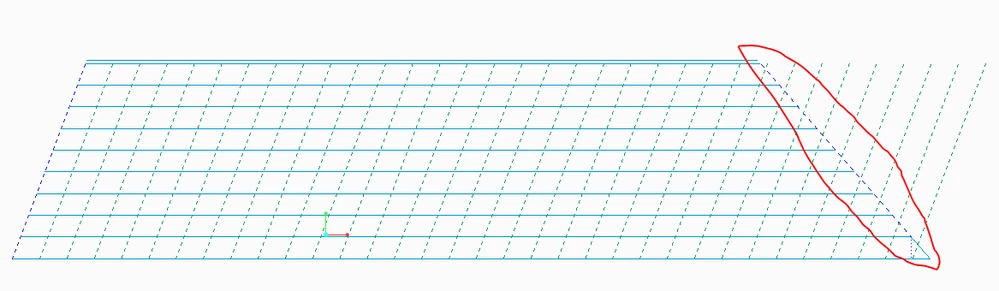

NEW.PNG

With Regards

Aghil.M

Best answer by psobejko

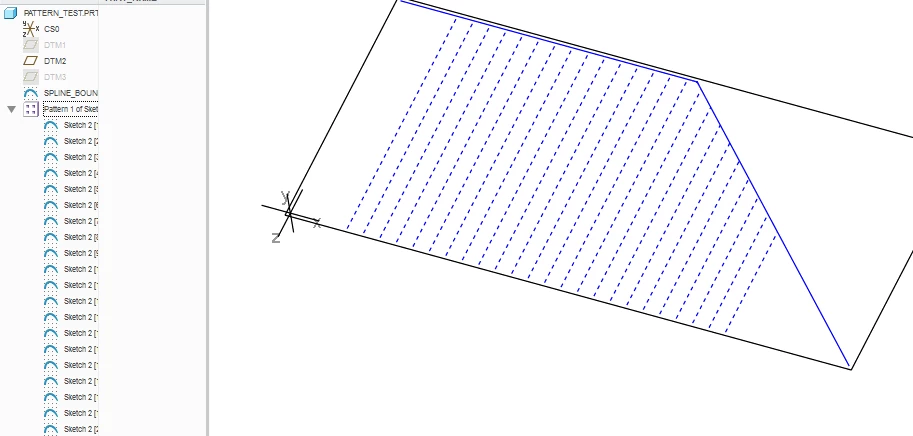
Try using the "convert to spline" function in the sketcher->operations->convert to->spline.

Sketch the boundary shape using lines.  Select them, and convert to spline.  This results in a single entity, that you can then use to constrain the endpoint of your vertical line in the sketch that will be patterned:
pattern_test.png


8 replies

1-Visitor
August 2, 2017

In a similar circumstance, where the pattern was relatively static, I made a temp drawing of the part, converted the view to draft entities, trimmed them on the drawing, exported as IGES, and then reimported the IGES file as a datum curve in the model. The result isn't parametric, but the process is fast and the original feature can be kept in the model and suppressed, so the process could be repeated if the spacing changes.


The main reason I did this is for speed. This pattern is simpler than what I had, but it still takes time to regenerate. An imported curve has no regeneration, so it's very fast.

1-Visitor
August 2, 2017

You could create a sketch of the area where you would like the pattern, and use it to create a fill pattern.

17-Peridot
August 3, 2017

Strange considration but should work quite well...

And please note I am speculating before I actually try this...


The assumption is that you want to pattern a horizontal line linearly within a trapazoid:

Sketch the line

Project the line on a surface the shape of the trapazoid

Pattern the Projection?  Pattern the line and the projection as a group... or something along these lines.


Now can you hide the surface and sketches to show only the curves generated by the projection feature?

psobejko1-VisitorAnswer
1-Visitor
August 4, 2017

Try using the "convert to spline" function in the sketcher->operations->convert to->spline.

Sketch the boundary shape using lines.  Select them, and convert to spline.  This results in a single entity, that you can then use to constrain the endpoint of your vertical line in the sketch that will be patterned:

pattern_test.png


1-Visitor
August 7, 2017

Hi @psobejko


Thanks a lot for the reply. This is what i was exactly looking for,


With Regrads

Aghil.M

24-Ruby III
August 4, 2017

Hi,


you can investigate attached part created in CR3 M100.

1-Visitor
August 7, 2017

Hello Everyone.


Thanks for the reply. All your method was helpfull.

But this task was a part of an Automation task so @psobejko  solution was more accurate for my problem.

So once again thanks to all of you for your attention.


With Regards

Aghil.M
