

9-Granite
August 10, 2016
Solved

How to display bend line in sheetmetal model?

  • August 10, 2016
  • 2 replies
  • 5267 views

I made planar feature in sheetmetal part.

And added flange wall on edge.

After applied flat pattern I would like to display bend line.

If impossible I would like to display original egde in flatten state.

Is it possible?


This thread is inactive and closed by the PTC Community Management Team. If you would like to provide a reply and re-open this thread, please notify the moderator and reference the thread. You may also use "Start a topic" button to ask a new question. Please be sure to include what version of the PTC product you are using so another community member knowledgeable about your version may be able to assist.
Best answer by mbonka

Hello Yong Bok Seo

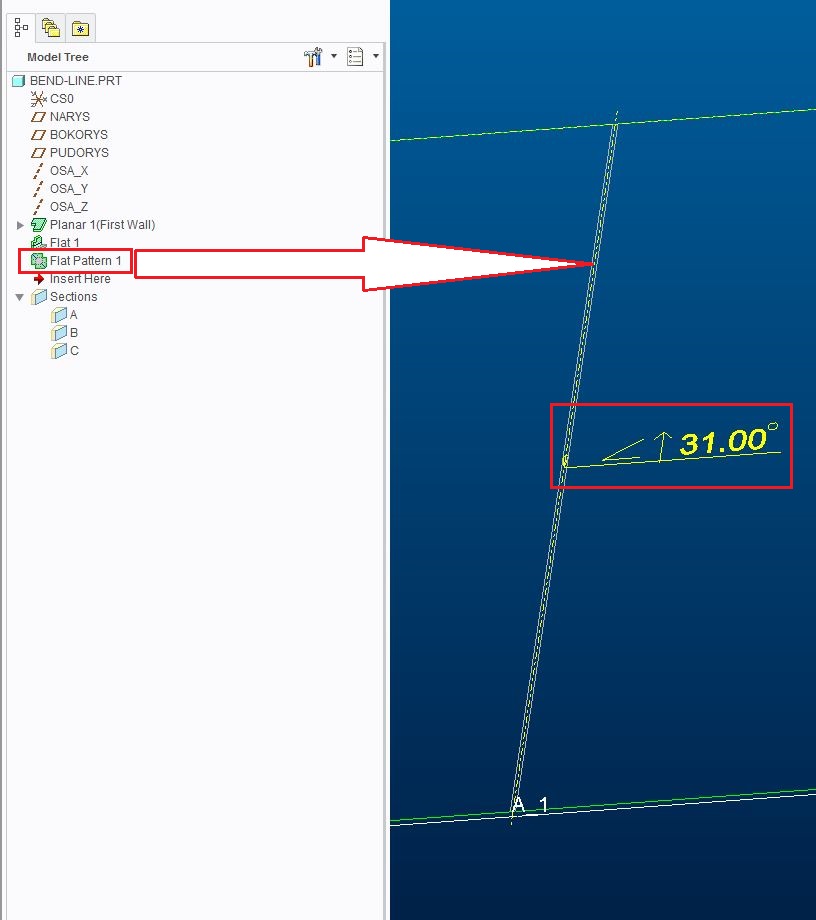
if your flat pattern was created succesfully, then should be created "bend axis" (in my opinion the same like bend lines). See attached picture.

bend_line-axis.JPG

In praxis l´m using this bend axis to sketch lines for engraving ---> it makes work easier for guys from workshop.

Hope it helps...

Regards

Milan Bonka

2 replies

mbonka2-ExplorerAnswer
2-Explorer
August 10, 2016

Hello Yong Bok Seo

if your flat pattern was created succesfully, then should be created "bend axis" (in my opinion the same like bend lines). See attached picture.

bend_line-axis.JPG

In praxis l´m using this bend axis to sketch lines for engraving ---> it makes work easier for guys from workshop.

Hope it helps...

Regards

Milan Bonka

yseo9-GraniteAuthor
9-Granite
August 10, 2016

Hello Milan Bonka

I am really happy to get your good solution.

Thanks a lot

Regards