

1-Visitor
May 12, 2016
Solved

How to get dimension constructions(Lines\arrows)

  • May 12, 2016
  • 1 reply
  • 1592 views

Hey guys!

Now I'm trying to get dimensions from a part.

What I did:

pfcModelItems_ptr items = solid->ListItems(pfcITEM_DIMENSION);

  for (xint dimesionId = 0; dimesionId < items->getarraysize(); dimesionId++)

  {

  const pfcDimension_ptr dimension = pfcDimension::cast(items->get(dimesionId));

  }

From the dimension I can get type(linear\angular\diameter etc.), value, additional symbols\text etc. etc.

That's fine. But what about relationship between this dimension(type+text\value) and an actual part\surface\edge\curve.

On the other hand, it would be great to have coordinates for these additional lines\arrows(that build a dimension) + position of the text\value of particular dimension.
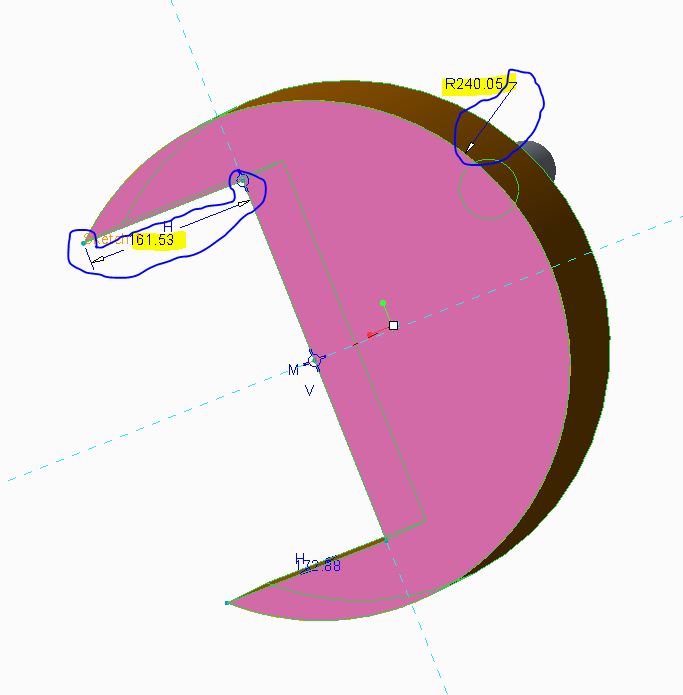
part.PNG

Unfortunately I couldn't find corresponding example or some sort of a description in the User Guide. I looked at "22. Dimensions and Parameters->Dimension Objects", p.329

I ran out of ideas

I would appreciate it if you could give me some advice.


This thread is inactive and closed by the PTC Community Management Team. If you would like to provide a reply and re-open this thread, please notify the moderator and reference the thread. You may also use "Start a topic" button to ask a new question. Please be sure to include what version of the PTC product you are using so another community member knowledgeable about your version may be able to assist.
Best answer by FV_01

Hi all,

Artem,

Dimensions & Parameters chapter is for driving dimensions - model shape manipulation via dimensions... The functionality to deal with part/assembly dimension semantics ( or cosmetics) is not in OTK as of Creo 3.0 level.  You'll need to use Pro/Toolkit and would need a license for 'TOOLKIT for 3D drawing' to access annotation elements in 3D models.

Without that extra license you would get a limited access to dimension properties but in any case you'll get more functionality comparing to OTK...

HIH.

Feliks.

1 reply

FV_01
FV_0117-PeridotAnswer
May 12, 2016

Hi all,

Artem,

Dimensions & Parameters chapter is for driving dimensions - model shape manipulation via dimensions... The functionality to deal with part/assembly dimension semantics ( or cosmetics) is not in OTK as of Creo 3.0 level.  You'll need to use Pro/Toolkit and would need a license for 'TOOLKIT for 3D drawing' to access annotation elements in 3D models.

Without that extra license you would get a limited access to dimension properties but in any case you'll get more functionality comparing to OTK...

HIH.

Feliks.

abursuk1-VisitorAuthor
1-Visitor
May 13, 2016

Hey Feliks,

Thank you for the answer, it really helps.

I found prootolkit User Guide and necessary information in "Dimension Location", p. 577

Now I need only to merge C functions into my code (Standard C++).

Thanks,

Artem