

1-Visitor
February 27, 2017
Solved

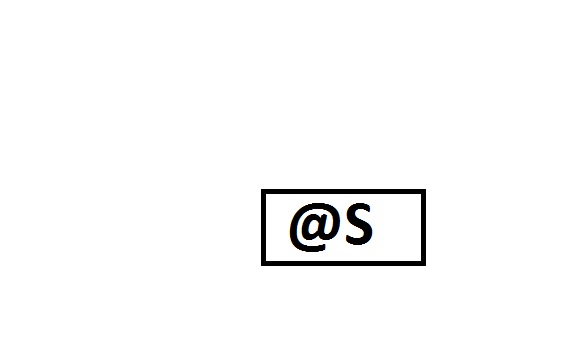
How to make @S DIMENSION AS BASIC DIMENSION?

  • February 27, 2017
  • 2 replies
  • 16671 views

OVERRITED.jpg NEED TO CREATE BASIC @S DIMENSION. HOW TO DO SAME.

ALSO SUGGEST FOR @O BASIC DIMENSION.

Creo‌

Best answer by Chris3

For a dimension set to @S, you should be able to just click the basic radio button in the display tab for the dimension properties.
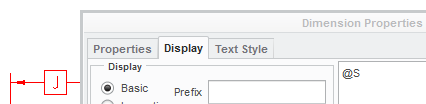
Capture.PNG

For @O you can add @[ and @] before and after your text like this:

@O@[YOUR TEXT GOES HERE@]

2 replies

Chris321-Topaz IAnswer
21-Topaz I
February 27, 2017

For a dimension set to @S, you should be able to just click the basic radio button in the display tab for the dimension properties.

Capture.PNG

For @O you can add @[ and @] before and after your text like this:

@O@[YOUR TEXT GOES HERE@]

achopade1-VisitorAuthor
1-Visitor
February 27, 2017

Hello Chris

Thanks for reply;

For @s its only taking whatever mention in name it wont allow spaces.

I need to mention DIM C so I am mention Name as C & in description I am writing DIM @S

It results DIM BASIC C not BASIC DIM C.

Please try with same . I am forcing @S because it will not give any error while running MODELCHECK regenerate.

For @O it is showing : Owerrited dimension as a warning

21-Topaz I
February 27, 2017

I think it is ASME Y14.5 that controls this (although I could be wrong). This behavior is intentional to comply with a standard. Only the dimension gets boxed. If you want something else you need to use the @[ and @]

23-Emerald III
February 27, 2017

If you add "dim" to the prefix box, it puts it inside the basic box.

OR

use the coding mentioned by Chris

@[DIM @S@]

to get the desired result without using the basic toggle

achopade1-VisitorAuthor
1-Visitor
March 22, 2017

Thanks Stephen;

Helps me a lot

Dale_Rosema
23-Emerald III
23-Emerald III
March 22, 2017

If either of those we correct. Go ahead and mark it as correct, for those who may search on this topic and find this thread.