

1-Visitor
July 14, 2015
Question

How to Model Eliptical Dome

  • July 14, 2015
  • 7 replies
  • 3498 views

Hi,

Can anybody pls help, i need to model a part as per the attached image.
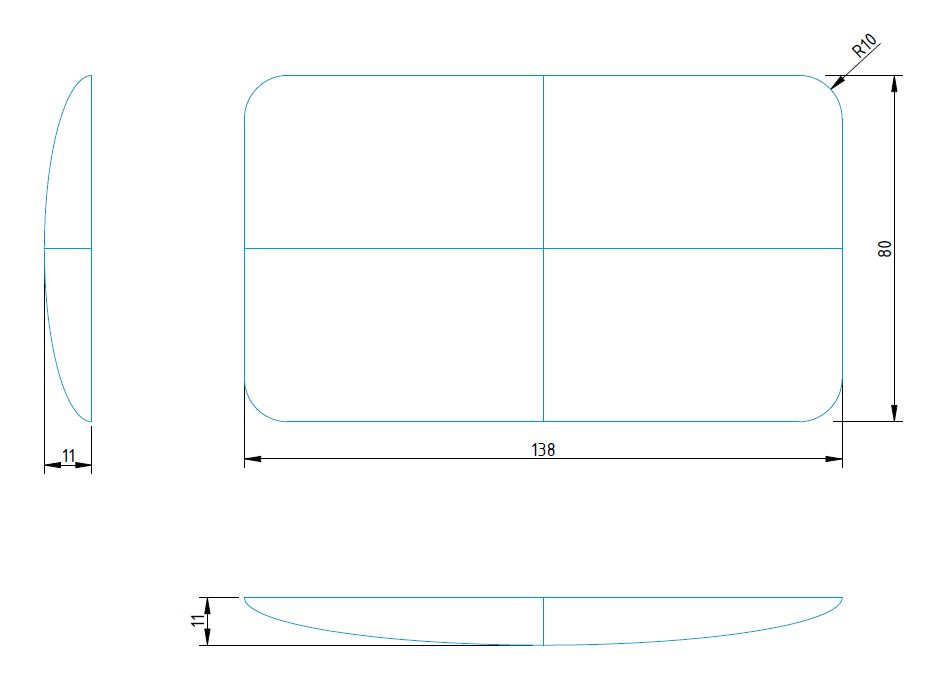
part.JPG

Thanks,

Shashank


This thread is inactive and closed by the PTC Community Management Team. If you would like to provide a reply and re-open this thread, please notify the moderator and reference the thread. You may also use "Start a topic" button to ask a new question. Please be sure to include what version of the PTC product you are using so another community member knowledgeable about your version may be able to assist.

7 replies

StephenW
23-Emerald III
July 14, 2015

The way I have done is to build 1/4 of it using curves, then use those curves to create a surface. Once you have 1/4 surface, you can mirror the surface to get 1/2 then mirror again to get the  whole. Then merge the surfaces. Once merged, you can solidify or add thickness as needed.

1-Visitor
July 14, 2015

Here's one approach:

2X conic sketches

rectangle boundary blend trimmed back

4 sided boundary around perimeter

dome.png

1-Visitor
July 15, 2015

Hi Steven,

i've taken your file, reduced number of sketches, added normal and tangency costraints to boundary blends and substituted style feature (requires license) with a simple boundary blend.

Take a look if you're interested. Creo 3.0 file attached.

Cattura.PNG

14-Alexandrite
July 15, 2015

Probably not blended as nice, but since there is nothing defining that in the original post. IT'S PERFECT!

DOMYTHINGY.JPG

1-Visitor
July 15, 2015

Attached is my effort to model this by creating one corner using boundary blends and then 2 mirrors to get the entire part. I added some intermediate curves in both directions to help control the blending and eliminate or minimize any ridges. I have not used style features so did not attempt using them to possibly improve the smoothness.

eliptical done part.JPG

17-Peridot
July 17, 2015

From a purely stylized perspective, I like the attached version.  Just difficult to control specific dimensions.

Creo 3.0 commercial version attached.

style_dome.PNG

prt0021a is closely scaled to the original.  If I was better at manipulating the primitive, it would be darn close.

style_dome_2.PNG

Patriot_1776
22-Sapphire II
July 17, 2015

Smooooooth!    Nice work!