

1-Visitor
June 8, 2016
Solved

How to rename a dimension in sketcher?

  • June 8, 2016
  • 2 replies
  • 5692 views

Can someone tell me how to rename dimensions in sketcher when using Creo 3.0? Apparently if the dimension name is modified to contain the letters DS, then when the model is imported into ANSYS, that software will recognize the dimension as parametric. Seems like a little rename like this should be obvious, but I cannot seem to figure it out.


This thread is inactive and closed by the PTC Community Management Team. If you would like to provide a reply and re-open this thread, please notify the moderator and reference the thread. You may also use "Start a topic" button to ask a new question. Please be sure to include what version of the PTC product you are using so another community member knowledgeable about your version may be able to assist.
Best answer by MartinHanak

Hi,

I think sketcher dimension you can see in Sketcher mode cannot be renamed, they follow default naming scheme sd0, sd1, ...

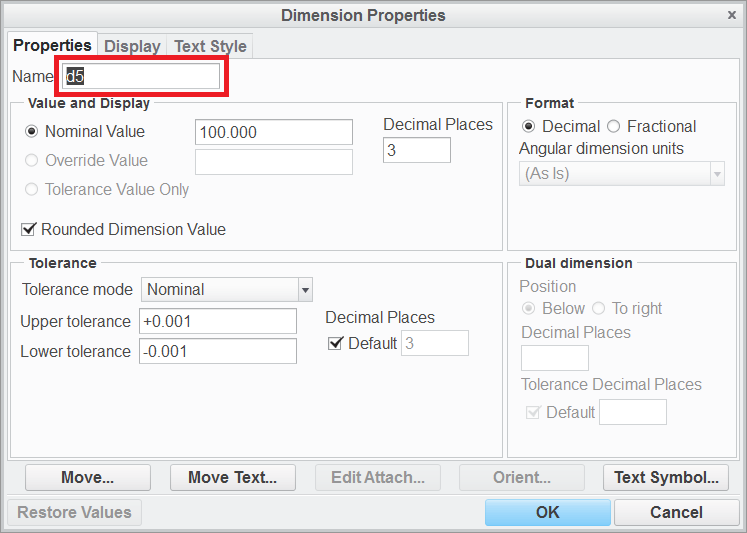
You can rename model dimensions - see picture.

modeldim.png

MH

2 replies

1-Visitor
June 9, 2016

Sketcher doesn't have names for dimensions, just index numbers d1, d4, so on.

The name is changed in the feature that is built from the sketcher geometry by selecting the properties for the dimension. It's in the requester/dialog box at the top.

24-Ruby III
June 9, 2016

Hi,

I think sketcher dimension you can see in Sketcher mode cannot be renamed, they follow default naming scheme sd0, sd1, ...

You can rename model dimensions - see picture.

modeldim.png

MH

1-Visitor
June 9, 2016

Thank you Martin, that was the key. It works perfectly.