

15-Moonstone
March 22, 2016
Solved

How to select all points to route pipe in Pro-piping ?

  • March 22, 2016
  • 2 replies
  • 1396 views

Hi..

As in WF5.0 there was an option to create pipe section through all points, But i am not able to get it in Creo2.0.

So please can i know how to create pipe section through all points.
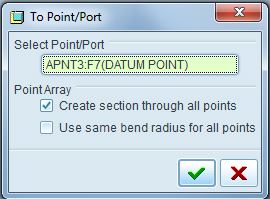
 

Capture.JPG


Regards,

Prashant Pandarkar


This thread is inactive and closed by the PTC Community Management Team. If you would like to provide a reply and re-open this thread, please notify the moderator and reference the thread. You may also use "Start a topic" button to ask a new question. Please be sure to include what version of the PTC product you are using so another community member knowledgeable about your version may be able to assist.
Best answer by JLG

You need to select the datum point feature instead of selecting one of the points in the graphics window.  The feature doesn't show up if you "pick from list" for reasons unknown to me.  You can either select the feature from the model tree or you can set your filter at the bottom to "Feature" and then select from the graphics window.

2 replies

JLG2-ExplorerAnswer
2-Explorer
March 22, 2016

You need to select the datum point feature instead of selecting one of the points in the graphics window.  The feature doesn't show up if you "pick from list" for reasons unknown to me.  You can either select the feature from the model tree or you can set your filter at the bottom to "Feature" and then select from the graphics window.

15-Moonstone
March 23, 2016

Thank you very much. Its working for me.

Regards,

Prashant Pandarkar