

1-Visitor
February 19, 2015
Solved

How to use PTC Creo Options Modeler

  • February 19, 2015
  • 1 reply
  • 4122 views

Hello,

I want to create automated design (assembly) linked to ANSYS Worbench.

Now I’m starting with Pro/Program and Notebook/Layout.

I saw a video about Creo Options Modeler in PTC Community and I want to now more and how this module works.

Is there a link between Options Modeler and ANSYS Workbench?

Is it possible to have a trial version of PTC CREO Options Modeler?

Thank you,

Farida.


This thread is inactive and closed by the PTC Community Management Team. If you would like to provide a reply and re-open this thread, please notify the moderator and reference the thread. You may also use "Start a topic" button to ask a new question. Please be sure to include what version of the PTC product you are using so another community member knowledgeable about your version may be able to assist.
Best answer by fsyed

Thank you for your answer,

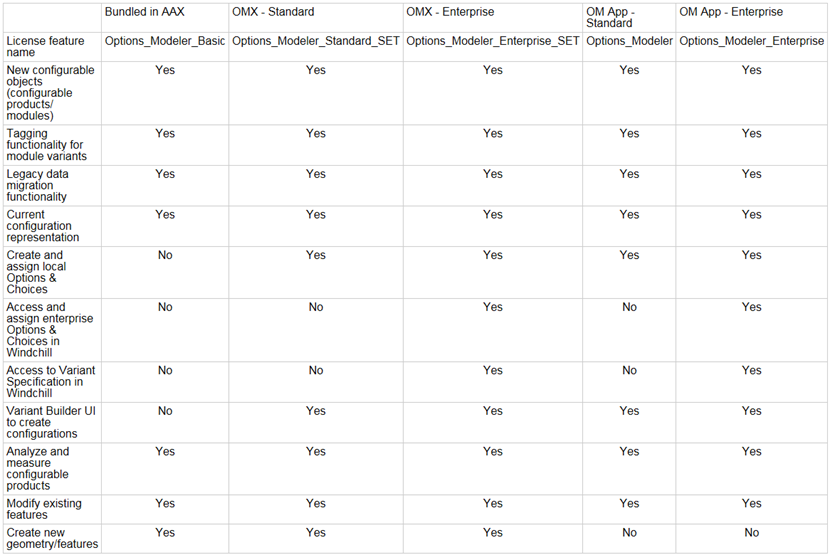
Actually, I've asked to our CAD consultant, I don't have the option "Create and assign local options and choices" in Options_Modeler_Basic.

By the way, he sent me a table that can be useful for someone who wants to use the feature of Options_Modeler.

Farida.

1 reply

24-Ruby III
February 19, 2015

Farida,

ask your PTC VAR for information.

Martin Hanak

fsyed1-VisitorAuthor
1-Visitor
February 20, 2015

Hi Martin,

Thank you for your answer, I've asked someone who manage license in my company and finally, I have already Options Modeler-Basic.

I'm trying to do an example but I can't select "Assign Choices" :

Does I have to select something in configuration options or it's because of the basic version of Opions Modeler?

Thank you

Farida.

1-Visitor
March 4, 2015

I don't know the functionality, but usually the buttons are grayed out, when the base for using the function is missing.

It seems you should have selected or defined some choices first before you can assign them (or you need to have a model open where you can assign the choice to)